ChatGPT planner: plan your day, your week and your goals
Set ChatGPT up as your planner in one prompt, plan a day, a week or a goal, and keep the plan going after the chat.
The short answer
ChatGPT makes a good free planner: give it your fixed times, your tasks and how much energy you have, and it turns them into a plan for today, the week, or a goal. Copy the setup prompt below to start. The part a chat doesn't do by itself is keep the plan and know where you are a few days later.
Can ChatGPT be your planner?
Yes, for the planning part. ChatGPT is quick at the things paper planners leave to you:
- turning a messy list into a short plan, in order
- sizing the plan to the hours you really have
- breaking a big goal into steps small enough to start
- re-planning in a minute when the day changes
What it doesn't do on its own is keep track. A plan made in a chat scrolls up and away, ChatGPT only knows a step is done when you tell it, and its memory keeps relevant details, not every detail of every conversation. So the best ChatGPT planner is two things: good prompts, and one place where the plan lives.
Which ChatGPT planner do you need?
| You want to plan… | Start with |
|---|---|
| Today, around fixed times | The ChatGPT daily planner prompts |
| The whole week | The ChatGPT weekly planner Sunday prompt and midweek check |
| A goal that takes weeks | The goal prompt below, then the ChatGPT goal setting prompt |
| Studying for exams | The ChatGPT study plan prompt |
| Training | The ChatGPT workout plan prompt |
| Steps across many days, with check-offs | The ChatGPT task tracker |
Set ChatGPT up as your planner, once
Instead of explaining yourself in every chat, set the rules once. Create a ChatGPT Project called "Planner" if you have Projects, and paste this as its instructions, or paste it at the start of a chat:
You are my planner. Keep it short and calm.
About me: [work or school hours, fixed commitments, best time of day]
How I plan: [for example, 3 things a day at most, steps of 25 minutes or less]

Each time I give you tasks or a goal:
1. Ask at most two questions if something important is missing.
2. Give me a plan that fits the time I have, with minutes for each step.
3. Put the first step at the top, small enough to start in 5 minutes.
4. When I say a step is done, update the plan and show the next one.
5. When my day changes, re-plan from what's left. Never pile up a backlog.
The bracketed lines are yours to fill in. The rules after them are what make the plans useful: a cap on how much goes in a day, minutes on every step, and a first step small enough to start.
A goal planner prompt
For a goal that takes weeks, like learning a language, running a first 5K or finishing a project, ask for the shape of the plan before the details:
Help me plan this goal: [goal]
By: [date, or "no deadline"]
Time I can give it: [minutes per day, days per week]

First, check the goal fits that time. If it doesn't, suggest a smaller version.
Then split it into weekly milestones, and give week 1 as steps
of 30 minutes or less, each starting with a verb.
End with the first step I can do today in 10 minutes.
Week 1 is the only week worth planning in detail. Ask for week 2 when you get there, with what really happened in week 1.
A printable or digital planner page
Many people want a page they can print or keep on their phone. ChatGPT can lay one out as a table you copy into a document, a spreadsheet or a notes app:
Make a one-page weekly planner as a table I can copy.
Columns: Monday to Sunday. Rows: Fixed times, Top 3, Small steps, Notes.
Fill it with this week's plan: [paste your plan or tasks]
Keep each cell under 8 words. Leave Sunday light.
A printed page has one weakness: it doesn't change when your week does. Keep the page for the view, and the plan where you can re-plan it.
Keep the plan after the chat
A planner only helps if you can find the plan on day four. Inside ChatGPT, three habits help:
- One place per plan. A Project, or one chat you return to, never a new chat each morning.
- A short checkpoint. Before you close, ask for the goal, what's done and the next step, in under 80 words, and keep it. How to save ChatGPT plans shows where.
- A restart rule. After a few days away, ask for today's step from where you stopped, not a new plan. How to resume a ChatGPT plan has the prompt.
A planner that stays in ChatGPT: Petipa
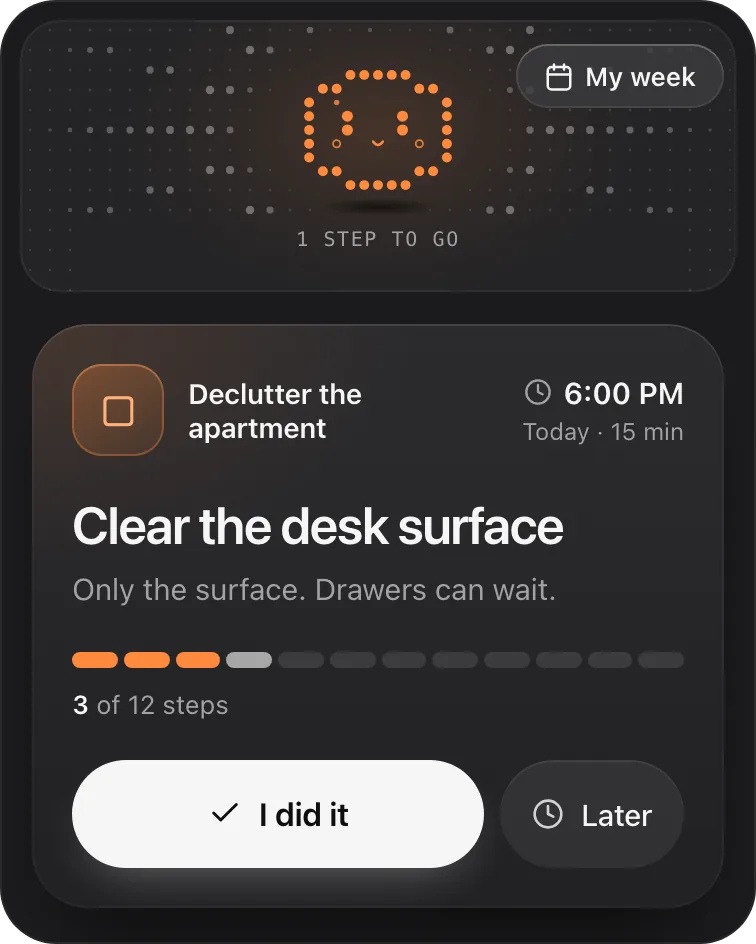
Those habits work, but someone has to keep them up. Petipa is an app inside ChatGPT that keeps the plan for you: ChatGPT makes the plan, Petipa remembers it after the chat is closed and shows you one small step at a time. It never stores your conversations. Here's how it works:
- Make the plan with any prompt on this page, adjust it until it fits, then say "save it to Petipa".
- Each day, ask "@Petipa what's my step today?" You see one step with its minutes, and the rest stays out of view.
- Tap I did it when it's done, or Later if today isn't the day. My week shows what's done and what's next.
Away for a few days? Nothing is lost: Petipa welcomes you back and you start again from today. If the plan needs to change, ChatGPT proposes it and Petipa saves it only after your yes. Petipa sends no reminders and has no calendar sync, so fixed appointments stay in your own calendar.
Petipa is in ChatGPT's plugin directory.
Enter a valid email.That didn't go through. Try again in a moment.
Add to ChatGPTQuestions
Can ChatGPT be used as a planner?
Yes. Give it your fixed times, tasks and energy, and it builds a plan for the day, the week or a goal. It plans well; keeping the plan and tracking what's done needs a Project, a checkpoint you carry, or an app that stores the plan.
Is there a free ChatGPT planner?
The prompts on this page work in any ChatGPT chat. Paste the setup prompt once, then give it your tasks each day.
Can ChatGPT create a digital planner?
It can lay out a planner page as a table you copy into a document, a spreadsheet or a notes app, and fill it with your plan. Ask for short cells and one page per week.
Can ChatGPT remember my plan?
Partly. With Memory on, ChatGPT can remember relevant details from your chats, but not every detail of every conversation, and what's available depends on your plan and settings. Keep the plan in one Project or chat, or save it to an app that stores it.
What's the best prompt to plan my day with ChatGPT?
Give it your fixed times, your tasks and how much energy you have, cap the day at three things, and ask for minutes on each step with the first step at the top. The daily planner article has three prompts to copy.