ChatGPT goal setting prompt: a goal that fits your week, and a first step for today
A prompt that asks before it plans, a goal sized to the time you really have, a first step small enough to start today, and a second prompt that pushes back when the plan is too big.
The short answer
A good ChatGPT goal setting prompt makes ChatGPT ask you a few questions first, then sizes the goal to the hours you really have each week, and ends with a first step of 10 minutes or less. Follow it with a second prompt that asks ChatGPT what's too much, because it tends to agree with big plans.
Why most goal setting prompts stop too early
Most goal setting prompts do one thing well: they turn a vague wish into a neat goal. "Get fit" becomes a goal with a number and a date, often followed by milestones and a long plan.
That part is easy, and it feels good. The trouble starts the next morning. The goal was sized for an ideal week, the plan is a wall of text, and nothing in it says what to do today. Many people who plan with ChatGPT describe this: talking the goal through feels like progress, and then the real work stalls.
The prompts below fix three things the usual ones skip:
- Questions before the plan, so ChatGPT plans for your life, not a generic one.
- A goal sized to your real hours, not the hours you wish you had.
- A first step you could do today, small enough that starting is the easy part.
If you'd rather set the goal on paper first, how to set goals walks through the same steps without a chat, with a template to copy.
The goal setting prompt
Copy this, fill in the brackets, and send it as one message.
Help me set one goal and make it doable.

What I want: [in my own words, e.g. "get back into running",
"finish the online course I started", "save for a trip"].
Why it matters to me: [optional, one line].
Time I really have for it: [e.g. 3 evenings a week, about 30 minutes each].
What usually gets in the way: [e.g. long workdays, I lose interest after
two weeks].

Before you write anything, ask me up to 5 questions, one at a time,
about anything you need to know. Then:
- Write the goal in one sentence, with what "done" looks like and a
  realistic time frame.
- Size it to the time I gave you. If it doesn't fit, make the goal
  smaller or the time frame longer, and tell me which.
- Break it into steps that start with a verb, each with its minutes.
- Give me a first step that takes 10 minutes or less and that I could
  do today.
- Show me only the goal, the first 3 steps and the first step for
  today. Keep the rest for later.
Why each line is there
| Line | What it does |
|---|---|
| What I want, in your words | The goal stays yours. ChatGPT shapes it, it doesn't pick it |
| Time you really have | The plan fits your week, not an ideal one |
| What gets in the way | The plan accounts for the week that really happens |
| Up to 5 questions, one at a time | ChatGPT fills gaps by asking, not guessing, and you answer one thing at a time |
| What "done" looks like | You'll know when you've reached it |
| Make it smaller or longer | The goal bends to your time, instead of your time stretching to the goal |
| Steps with minutes | Each step shows its size before you start |
| A first step of 10 minutes or less | Something you could do today, before the plan feels heavy |
| Only the first 3 steps | Less to read, so the plan doesn't become one more pile |
Leave "why it matters" blank if it feels forced. A goal doesn't need a speech to count.
The pushback prompt: make ChatGPT disagree before you commit
ChatGPT tends to go along with what you ask. If you say you'll run five days a week while working late, it will often build that plan without a word. So before you accept the goal, send this in the same chat:
Look at this goal and plan again, as if you were a friend who wants
me to succeed but doesn't flatter me.
- Where is it most likely to be too much for the time I have?
- What am I not considering?
- What would a version half this size look like?
Don't rewrite the plan yet. Just answer.
Then pick: keep the plan, or ask for the smaller version. Many people find the smaller version is the one they actually do. You can always grow a goal that's going well. A goal that's too big from day one usually gets dropped quietly.
A quick check of your own helps too: add up the minutes of one week of steps and compare them with the time you wrote down. If they don't match, ask ChatGPT to cut until they do.
Turn the goal into this week
A goal only moves when something happens this week. Once the goal is set, ask:
Plan only this week for this goal. Use the time I gave you.
Put one step on each day I have time, with its minutes. Leave one of
those days lighter, with a short version of the step. Show it as one
line per day.
A lighter day isn't a weaker plan. It's room for a week that goes differently, so one off day doesn't break the whole thing. For the rest of your week around the goal, the ChatGPT weekly planner guide has a Sunday prompt and a midweek check.
If the first step still feels hard to start, ask for something smaller:
I'm stuck on [step]. Give me a version that takes 5 minutes, and tell
me it's fine to stop after it.
Stopping after a small step counts. More on that first minute in how to start a task.
Keep the goal past the first chat
The goal is set in one chat. Following it takes weeks. A few things make that easier inside ChatGPT:
- Give the goal its own Project. Projects are available on free and paid ChatGPT plans. Create one named after your goal, then open its ••• menu, choose Project settings, and add instructions such as: "This Project is for my goal: [goal]. When I check in, start from the next step. Don't comment on days I didn't do anything." Project instructions apply only to chats inside that Project.
- Keep a copy of the goal and the steps outside the chat, in a note you can open in a second. Don't count on ChatGPT to remember the whole plan.
- Check in briefly, then close the chat. "Done: [step]. What's next?" is enough. Long talks about the goal can feel like work on it while the goal itself stays put.
- Let something remind you. A chat waits for you to open it. A phone alarm works, and so can a ChatGPT scheduled task, depending on your ChatGPT plan.
- Coming back after a gap? Paste the goal and the last step you did, and ask: "I'm back after some days away. Don't re-plan from scratch. What's one small step to start again today?"
Many people who plan with ChatGPT say the tiring part is explaining everything again. Keep the setup small. If keeping the system going costs more than it gives back, drop a piece of the routine, not the goal.
For checks you'd want with stakes, like money or health, ask a real source or a professional too. ChatGPT can sound sure and still be wrong.
Looking for a goal to start with? New year resolution ideas lists fifty, each with a first step.
How Petipa keeps your goal going, one step a day
The prompts above work with ChatGPT alone, but you still carry the plan from chat to chat. Petipa is an app inside ChatGPT that keeps the plan for you. ChatGPT helps you set the goal and make the plan; Petipa keeps it after the chat is closed, and never stores your conversations. Here's how it works:
- Set the goal and make the plan in ChatGPT with the prompts above, check it, then say "save it to Petipa".
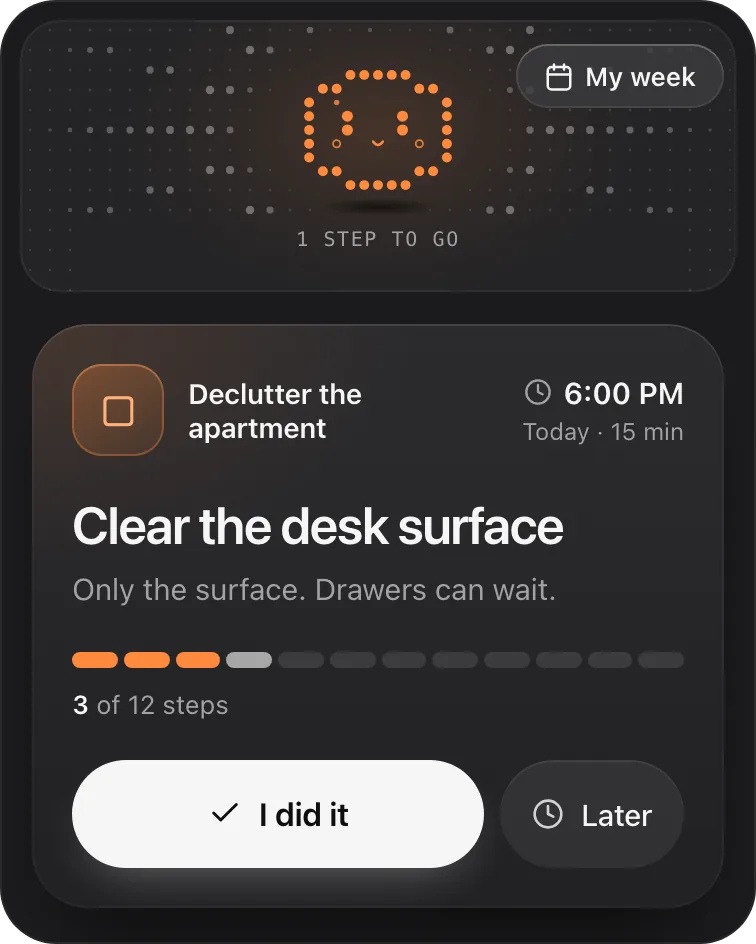
- Each day, ask "@Petipa what's my step today?". You see one step with its minutes, not the whole plan.
- Tap I did it when it's done, or Later if now isn't the moment. My week shows what's done and what's coming up this week.
Away for a few days? Nothing is lost. Petipa welcomes you back calmly, and you start from today. If the plan needs to change, Petipa asks before it changes it.
What it doesn't do: Petipa never invents a goal, a reason or a milestone for you; the goal stays the one you set. It sends no reminders, so you still start the check-in yourself, and a phone alarm that says "ask @Petipa what's my step today?" covers that. A last step checked off is a plan finished, not proof the goal is reached; that call is yours.
Petipa is in ChatGPT's plugin directory.
Enter a valid email.That didn't go through. Try again in a moment.
Add to ChatGPTQuestions
What is a good ChatGPT goal setting prompt?
One that gives ChatGPT your goal in your own words, the hours you really have and what usually gets in the way, then asks it to ask you questions first. It should end with steps that have minutes and a first step of 10 minutes or less.
How do I use ChatGPT to set goals?
Describe what you want and the time you have, let it ask a few questions, and ask for one goal sized to that time. Then ask it what's too much before you commit, and plan only the first week.
Can ChatGPT write SMART goals?
Yes. Ask it to make the goal specific, measurable and time-bound, then add the hours you really have so the "achievable" part is checked against your week, not assumed.
Why does ChatGPT make my goals too big?
It tends to agree with what you ask, so an ambitious request gets an ambitious plan. Ask it where the plan is too much and what a version half the size would look like, then pick.
How do I use ChatGPT to achieve goals, not just set them?
Keep the goal in one Project, keep a copy outside the chat, and check in briefly with what you did and what's next. After a gap, ask for one small step to restart today instead of a new plan.