ChatGPT weekly planner: plan the week, and keep it going past Wednesday
A Sunday prompt that fits your real week, a midweek check that starts from what really happened, and a way to carry unfinished steps forward without a pile.
The short answer
A ChatGPT weekly planner works best when you give it your fixed times first, then ask for three priorities, one lighter day and steps with minutes. Plan on Sunday, check in once midweek with what really happened, and carry unfinished steps into next week as a short list, not a backlog.
Why a week planned in ChatGPT stops matching your week
A weekly plan from ChatGPT looks finished the moment you get it: every day filled, every task placed. By Wednesday it usually isn't true anymore. A meeting moved, a task took twice as long, one evening disappeared.
The plan itself isn't the problem. It's a snapshot, and a week keeps moving. Most weekly planning prompts stop at the snapshot. The method below adds two small pieces: a midweek check that updates the plan from what really happened, and an end-of-week step that carries a few things forward and lets the rest go.
The Sunday prompt: one week that fits
Copy this, fill in the brackets, and send it as one message. It takes about ten minutes, most of it filling in your fixed times.
Be my weekly planner. Plan the week of [date].

Fixed times I can't move: [Monday 9 to 5 work, Tuesday 6 pm class,
Thursday dentist at 2, Saturday morning kids' practice].
Time I really have for my own tasks: [about 1 hour on weekday
evenings, 3 hours on Sunday].
What's on my mind this week: [everything, in any order].

Rules:
- Pick at most 3 priorities for the week, and tell me why each one.
- Put everything else on a "not this week" list.
- Break each priority into steps that start with a verb, and give
  each step its minutes.
- Fit the steps into my free time only. Never plan over a fixed time.
- Make one weekday lighter, with a single short step or nothing.
- Leave some time unplanned every day.
- Show the week as one short line per day.
- Before you write the plan, ask me up to 3 questions if anything
  is unclear.
Why each line is there
| Line | What it does |
|---|---|
| Fixed times first | The week gets built around what can't move, so the plan doesn't fight your calendar |
| Time you really have | Steps sized to your real evenings, not an ideal week |
| At most 3 priorities | A week that's possible, and a clear answer when you have to choose |
| A "not this week" list | Somewhere for everything else, so it's out of your head without being in your week |
| Steps with minutes | Each day shows something you could start, and how big it is |
| One lighter day | Room for the week to go differently without breaking the plan |
| One line per day | A week you can read in one look, instead of a wall of text |
ChatGPT tends to agree with what you ask, and it will happily fill every evening if you let it. Before you accept the plan, send one more message:
Look at this week again. Where is it most likely to be too much?
What am I not considering? Suggest changes, but don't rewrite it yet.
Then add up the minutes. If the week asks for more time than you wrote down, ask it to cut until it fits.
ChatGPT doesn't see your calendar here. It only knows the fixed times you typed. Keep your appointments in your own calendar, and paste them in each Sunday.
The midweek check: re-plan from what really happened
Pick one day, Wednesday works for many people, and spend two minutes on this. Go back to the same chat, so the plan is still there, and send:
Midweek update.
Done so far: [list].
Didn't happen: [list].
What changed: [Thursday evening is gone, I'm tired].

Re-plan Thursday to Sunday. Don't try to fit in everything that
didn't happen, and don't comment on it. Keep the 3 priorities
unless one no longer matters. Move what doesn't fit to "next week"
and tell me in one line what moved. Show the rest of the week as
one short line per day.
"Don't try to fit in everything" is the line that matters. A plan that stacks every skipped step onto the next two days makes the rest of the week heavier than the start, and that's when many people drop the plan altogether.
If one step keeps getting pushed, it's often too big or unclear. Ask:
I keep putting off [step]. Break it into smaller steps of 15 minutes
or less, and tell me only the first one.
Our guide on how to start a task has more on getting through the first few minutes.
End of the week: carry forward without a backlog
Unfinished steps are normal. The trouble starts when every one of them rolls into next week, and the week starts already full. On Saturday or Sunday, before the next Sunday prompt, send:
End of week. Here's what got done: [list]. Here's what didn't: [list].

Sort what didn't get done into three groups:
1. Carry forward: at most 3 steps that still matter for next week.
2. Later: things that matter, but not next week.
3. Let go: things I can drop without real cost.
Then write a 5-line recap I can paste into next Sunday's plan.
Carrying three steps forward is a choice. Carrying everything forward is a pile. The "later" list keeps the rest without putting it in front of you, and "let go" is allowed: a week where you did less than you planned still moved.
Then start next Sunday's prompt by pasting the recap: "Here's last week's recap. Carry these forward."
Keep the planner in one place
A weekly planner only helps if next Sunday starts from this one. A few things make that easier inside ChatGPT:
- Give it its own Project. Projects come with every qualifying ChatGPT plan when you're signed in. Create one called "Weekly planner", then open its ••• menu, choose Project settings, and add instructions such as: "Each Sunday I'll paste last week's recap. Start from it. Never comment on what didn't get done." Project instructions apply only to chats inside that Project.
- Start a new chat each week inside the Project. One endless thread gets hard to scroll, and early details get buried. More on why in how to make ChatGPT remember previous conversations.
- Keep a copy of the plan and the recap outside the chat, in a note you can open in a second. Don't count on ChatGPT to remember your list.
For one setup that covers the day, the week and longer goals, see the ChatGPT planner prompts.
- Let something remind you. A chat waits for you to open it. A phone alarm on Sunday evening and on Wednesday works, and so can a ChatGPT scheduled task, depending on your ChatGPT plan.
Many people who plan with ChatGPT describe the setup as the tiring part: explaining the week again, pasting the list again. Keep it light. If the routine costs more than it gives back, drop the midweek check before you drop the plan.
For the day itself, one step at a time, see the ChatGPT daily planner. This page is about the week.
How Petipa keeps your week, one step at a time
The method above works with ChatGPT alone, but you're still the one carrying the plan from Sunday to Sunday. Petipa is an app inside ChatGPT that keeps the plan for you. ChatGPT still makes the plan with you; Petipa keeps it after the chat is closed, and never stores your conversations. Here's how it works:
- Make your plan in ChatGPT, check it, then say "save it to Petipa".
- Each day, ask "@Petipa what's my step today?". You see one step, with its minutes, instead of the whole week.
- Tap I did it when it's done, or Later if now isn't the moment. My week shows what's done and what's coming up this week.
Had a week that went sideways? Nothing is lost. Petipa welcomes you back calmly, and you start from today. If the plan needs to change, Petipa asks before it changes it.
What it doesn't do: Petipa sends no reminders, so you still start the check-in yourself. A phone alarm that says "ask @Petipa what's my step today?" covers that. It doesn't sync with your calendar either, so your appointments stay in your own calendar. Petipa is for plans that run over days and weeks, not for timing every hour.
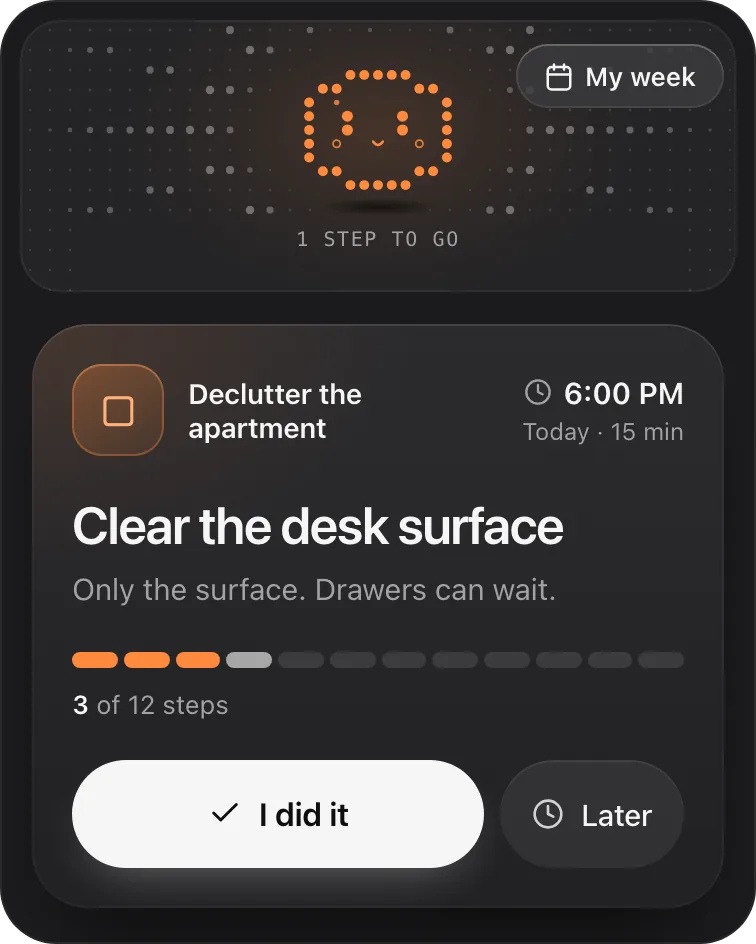
Petipa is in ChatGPT's plugin directory.
Enter a valid email.That didn't go through. Try again in a moment.
Add to ChatGPTQuestions
Can ChatGPT be a weekly planner?
Yes. Give it your fixed times, the free time you really have and what's on your mind, and ask for at most three priorities with steps and minutes. It plans well in one sitting; keeping the plan current takes a short midweek check.
What are good ChatGPT prompts for weekly planning?
Three cover most weeks: a Sunday prompt that builds the week around your fixed times, a midweek prompt that re-plans from what really happened, and an end-of-week prompt that sorts unfinished steps into carry forward, later and let go.
How do I make a weekly schedule with ChatGPT?
List your fixed times first, then the free time you have each day, then your tasks. Ask it to plan only into your free time, add one lighter day, and show the week as one short line per day.
Can ChatGPT see my calendar to plan my week?
In the method here, no: it only knows the fixed times you type in. Paste your appointments each Sunday and keep them in your own calendar.
What do I do with tasks I didn't finish this week?
Carry at most three into next week, move the rest to a "later" list, and let go of anything that no longer matters. Rolling everything forward starts the next week already full.
What if my week goes off track by Wednesday?
Tell ChatGPT what got done, what didn't and what changed, and ask it to re-plan the rest of the week without fitting in everything that didn't happen. Keep the priorities, and move what doesn't fit to next week.