ChatGPT daily planner: how to plan your day, and keep the plan tomorrow
Three prompts for today, and a simple way to carry the plan into tomorrow and the weeks after.
The short answer
A ChatGPT daily planner works best when you give it your fixed times, energy and tasks, then ask for one next step with its minutes, or a short schedule when the day needs a clock. To keep the plan tomorrow, use one ChatGPT Project, end each day with a short recap, and re-plan when the day changes.
ChatGPT as a day planner: what it does well, and what it doesn't
ChatGPT is a good day planner in the moment: give it a messy list and a few facts about your day, and it can put them in order in one reply.
It's good at:
- Turning a brain dump into an order. Paste everything and ask what comes first.
- Fitting tasks around fixed times. A call at 11 and a pickup at 3:30 are easy for it to plan around.
- Re-planning fast. When the day changes, it can redo the rest in one reply.
It's less good at:
- Knowing your real day. It only knows what you tell it. If the meeting ran long, say so.
- Knowing how long things take. Its time estimates are guesses. Many people find an estimate still helps, because a dreaded task looks small enough to start. Ask for one, add a buffer, and check it against how long the task really took.
- Following up. A plan in a chat is a snapshot, and the chat waits for you to open it. A scheduled task can nudge you (more on that below).
- Tomorrow. By next week, today's plan is buried in a long thread nobody reopens.
Three ChatGPT daily planner prompts to copy
Copy one, fill in the brackets, and send it as one message.
1. One next step, not a full schedule
A time-blocked day looks tidy, but seeing every step at once can feel as heavy as the work itself.
Be my daily planner. Here's today:
- Fixed times: [call at 11, pickup at 3:30]
- Time for my own tasks: [about 3 hours]
- My energy is best: [in the morning]
- Tasks, in any order: [everything on my mind]

Don't give me a schedule. Pick the one task that matters most today
and give me its first step, starting with a verb, with how many
minutes it takes. Make it a step that fits before my next fixed
time. Show nothing else. When I say "next", give me the next step
the same way.
"Show nothing else" is the line that matters. The list is still there; you just don't have to look at it.
2. A short daily schedule, for days with fixed times
Some days need a clock. This daily schedule prompt keeps it short, so one delay doesn't break it.
Make me a simple schedule for today. My day runs [9 to 6].
Fixed times first: [list].
Then at most 3 tasks, the most important first: [list, with a rough
time for each if you know it].
Add a buffer after anything that might run long. Leave the rest of
the day unplanned. End with one line: if only one thing gets done
today, which one?
The last line is your fallback when the day changes.
3. Re-plan a day that went off track
This prompt starts from what really happened, with no guilt and no catching up.
Update on today. Done: [X]. Didn't happen: [Y].
I have [2 hours] left and my energy is [low].
Re-plan the rest of today. Don't try to fit everything in, and
don't comment on what didn't happen. Tell me in one line what you
moved to tomorrow, then give me one next step with its minutes.
If that step still feels big, reply "smaller". A small step on a messy day still moves the plan (more on starting when you're stuck).
To plan a week or a goal as well as the day, start from the ChatGPT planner setup prompt, which sets ChatGPT up once for all three.
How to keep the plan tomorrow, inside ChatGPT
A daily planner only helps if tomorrow starts from today. In ChatGPT alone, that takes three pieces.
Give the planner its own Project, not one long chat
Projects come with every qualifying ChatGPT plan when you're signed in. Select New project in the sidebar and call it "Daily planner". Then open the Project's ••• menu, choose Project settings, and add these instructions:
This Project is my daily planner. Each morning I'll paste
yesterday's recap. Start from it and give me one next step with
its minutes. Never comment on days I skipped.
Project instructions apply only to the chats inside that Project, so your other chats stay as they were.
Start a new chat inside the Project each day, not one endless chat: a long thread is hard to scroll back through, and decisions made early on get buried (why ChatGPT forgets). You can add bigger plans as files. How many depends on your plan: 5 files per Project on ChatGPT's Free plan, more on paid plans, as of October 2026.
A Project can also use project-only memory, which you can pick in Project settings. Don't count on memory for what's done, though: project memory doesn't show you a list of what it remembers, while the recap is a record you can read and check.
End each day with a short recap
Before you close the chat, send:
End of day. Write my recap for tomorrow in 5 lines or fewer:
what got done, what's still open, what moved, and the first step
for tomorrow with its minutes.
Copy the recap. Tomorrow, open a new chat in the Project, paste it, and add "What's my step today?".
Keep it light: a recap of the day, not a review of yourself. Skipped a day, or a week? Paste the last recap you have, say how long it's been, and ask for one step from today. Don't catch up.
Set a daily nudge: a scheduled task or your own alarm
A chat never starts the conversation, so something has to remind you to open it. Some people who plan with ChatGPT bring their own trigger: a daily phone alarm or calendar event that says "Open the Daily planner Project".
Inside ChatGPT, scheduled tasks can do the nudging, by push notification or email. Ask for one in a chat:
Every morning, send me a reminder: "Open your Daily planner
Project and paste yesterday's recap."
What you get depends on your ChatGPT plan. As of October 2026, ChatGPT's Free and Go plans allow 3 active scheduled tasks, and higher plans allow more. On the Free plan, a task runs at most once a day, in a flexible window such as morning, afternoon or night, so "every morning" means sometime in the morning. Exact times and hourly schedules need an eligible paid plan.
To get the reminder, choose push, email or both under Settings > Notifications. For phone alerts, create the task in the ChatGPT mobile app and allow notifications when it asks; on the web, allow your browser's notification prompt.
Tasks don't work with GPTs, voice chats or locked chats. If your daily planner was a custom GPT, read what to do about custom GPTs. You can see, edit or pause your tasks on ChatGPT's Scheduled page, or through Settings > Notifications > Manage tasks.
A scheduled task is a nudge, not a tracker. The recap still keeps track of what's done.
How to stick to a plan ChatGPT made you, one day at a time
A 12-week plan from ChatGPT looks great the day you make it. Then each morning you have to find it, work out where you are, and pick today's part. That daily decision is where big plans often stall, and why it's easy to keep making new plans instead of following one.
The fix is to stop asking for plans, and start asking for today's step from the plan you have.
-
Save the plan once. Add it to your planner Project as a file, or, in a Project chat, open the menu on the reply that holds it and choose Add to project sources. If the plan is in another chat, open that chat's menu and choose Move to project first. Then stop asking for new versions.
-
Ask for today's slice.
Here's my plan: [paste it, or "the plan file in this Project"]. Here's my last recap: [paste it, or say where you are, like week 3, day 2]. Today I have [30 minutes]. What's the one step from this plan to do today? Give me its minutes and one line on why it comes next. -
Write down what you really did in your recap. If you did a shorter version, say so.
-
After days away, pick up from today. Don't restart, and don't pile the skipped days onto today.
I'm back on this plan after [6 days] away. Start from where I am
now, not from where the plan expected me to be. If the plan is too
heavy now, propose a lighter version and wait for my yes before
changing anything.
"Wait for my yes" keeps you in charge: ChatGPT suggests, you decide.
If one appointment later in the day freezes the hours before it, waiting mode has a way through, and time management for ADHD covers sizing the day to the time you really have. To give the day a steady start, a short morning routine with minutes on each step helps.
Keeping a plan day to day with Petipa
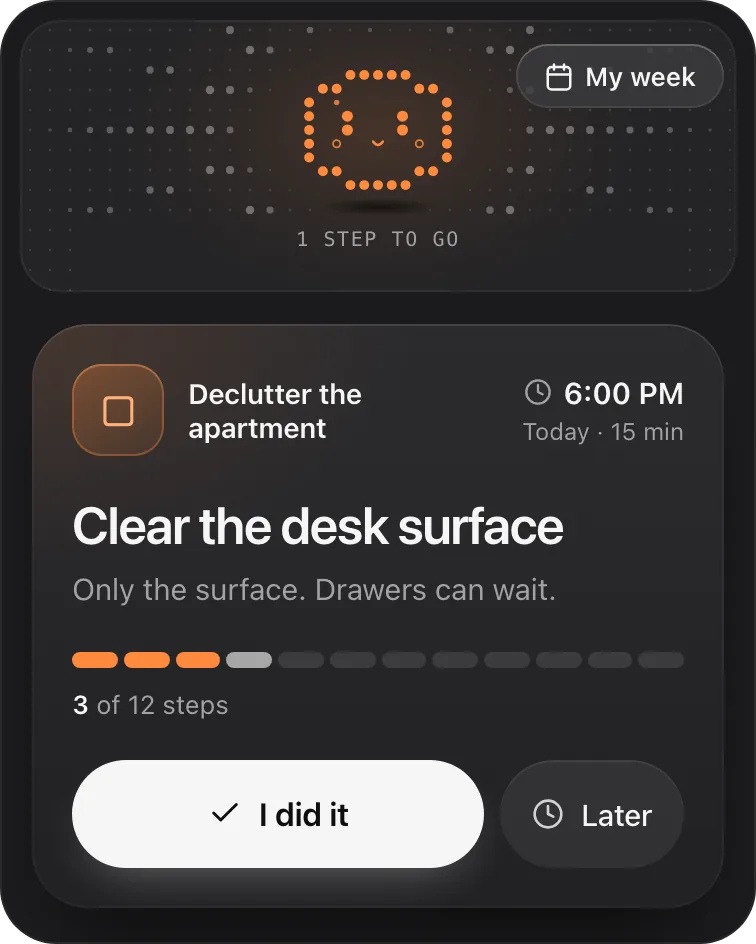
The method above works without any extra tool, but you're still the one carrying the plan: the Project, the recap, the copy and paste each morning. Many people who plan with ChatGPT describe that daily briefing as a chore of its own. Petipa is an app inside ChatGPT (a plugin) that carries the plan for you. ChatGPT makes the plan; Petipa keeps it and shows you today's step. Here's how it works:
- Ask ChatGPT for a plan, or paste the one it already made, and say "save it to Petipa".
- Each day, ask "@Petipa what's my step today?". You see one step, with its minutes, and two buttons: I did it and Later.
- My week shows what's done and what's next.
Away for a few days? Petipa welcomes you back, and nothing is lost: start from today, or make the plan lighter. When the plan needs to change, ChatGPT proposes the change, you say yes, and then Petipa saves it.
What it doesn't do: Petipa sends no reminders, so you still start the check-in yourself. A daily phone alarm that says "Ask @Petipa what's my step today?" covers that. It doesn't connect to your calendar either: if your day lives in your calendar, a calendar scheduling app is a better fit. Petipa is for plans that run over days and weeks.
Petipa keeps your plans, steps and checks. It doesn't store your conversations.
Petipa is in ChatGPT's plugin directory.
Enter a valid email.That didn't go through. Try again in a moment.
Add to ChatGPTQuestions
Can ChatGPT plan my day?
Yes. Give it your fixed times, your free time, your energy and your tasks, and ask for one next step with its minutes. Carrying the plan into tomorrow takes a ChatGPT Project and a short daily recap.
What's a good ChatGPT daily planner prompt?
A good ChatGPT daily planner prompt lists your fixed times, free time, energy and tasks, then asks for the most important task's first step, with its minutes, instead of a full schedule.
How do I use ChatGPT to create a daily schedule?
Say when your day starts and ends, list your fixed times, then at most three tasks with rough times. Ask for buffers and some unplanned time, and end by asking which one task matters most if the day changes.
How do I re-plan my day in ChatGPT when it changes?
Tell ChatGPT what got done, what didn't, and how much time and energy you have left. Ask it to re-plan the rest without catching up, then give you one next step with its minutes.
Can ChatGPT remind me about my plan every day?
Yes, with a scheduled task; how many you can have and how often they run depend on your ChatGPT plan. As of October 2026, on ChatGPT's Free plan a task runs at most once a day, in a flexible window, and reaches you by push or email. Exact times need an eligible paid plan.
What if I skip a day of my ChatGPT plan?
Pick up from today, not from where the plan expected you to be. Paste your last recap, say how long it's been, and ask for one step for today; if the plan feels heavy now, ask for a lighter version.
How do I stick to a 12-week plan ChatGPT made me?
Save the plan once, in a Project, and each day ask only for today's step from it, with your last recap. Write down what you really did, even if it was a shorter version.
What's the best way to keep track of plans I make with ChatGPT?
Keep the plan in one place and record what's done there. Inside ChatGPT alone, that's a Project and a short daily recap you paste back. A plugin made for plans, like Petipa (in ChatGPT's plugin directory since October 2026), keeps the plan and shows you one step each day. If your day lives in a calendar, a calendar app fits better.