ChatGPT task tracker: keep the plan, record what's done, see what's next
Keep a plan made with ChatGPT going for days: a status table, a short checkpoint you carry into new chats, and one next action instead of the whole list.
The short answer
A ChatGPT task tracker needs three things: one saved plan, a clear record of what you finished, and one next action. ChatGPT can keep a status table inside a chat when you tell it what's done. For a plan that lasts weeks, carry a short checkpoint into new chats, or keep the plan outside the conversation.
Why a task list inside a chat drifts
Ask ChatGPT to turn a goal into a plan and you get a useful breakdown in seconds. The harder part comes the next day: the plan is ten screens up, a meeting changed your afternoon, and you're no longer sure whether task three is done.
A chat is good at making a plan. It isn't a record of what's finished. ChatGPT only knows a task is done when you tell it, and its memory keeps relevant details, not every detail of every conversation. So the status of each step needs a place of its own.
Does ChatGPT have a task tracker?
Not one built in for the steps of your own plan. ChatGPT has a feature called scheduled tasks, but despite the name, it's for messages ChatGPT sends you at a time you pick, by push or email: a reminder, a daily summary, a nudge. What you can schedule, and how often, depends on your ChatGPT plan. Business and Enterprise workspaces also have team tasks, which run saved instructions on a schedule. Neither is built to mark the steps of a plan done.
For tracking a plan, you have three options, from lightest to sturdiest:
| Option | Good for | Watch out for |
|---|---|---|
| A status table in the chat | A plan that lasts a few days | The chat grows long and the table scrolls away |
| A checkpoint you carry into new chats | A plan you return to across weeks | You have to remember to make and paste it |
| A tool that stores the plan | Many steps over weeks, with check-offs | One more thing to set up |
What a good ChatGPT task tracker needs
- One saved plan. The goal, your constraints and the current steps, kept together.
- Explicit completion. You say what's done. The tracker never guesses.
- One next action. Open it and see something small enough to start today, not the whole list.
You don't need a complicated system to get those three. A table and a habit of saying "done" go a long way.
A ChatGPT task tracking prompt you can copy
Paste this into a new chat, or into a ChatGPT Project if you have one for this goal:
I want to track a plan across several days.
Goal: [your goal]
Time I have: [minutes per day, days per week]
Constraints: [anything important]

Make a realistic plan with small steps, each starting with a verb.
Keep a task table with ID, next action, estimated minutes,
and status (not started, in progress, done).
At the end, show only today's first action.
When I tell you I finished something, update the table
and give me the next action. Keep your answers short.
If I come back after a few days, ask what changed before replanning.
When you finish a step, say it plainly: "Done: T2." Short reports keep the table accurate and the chat easy to scan.
Example: a small plan that survives a busy Monday
Say your goal is to put together a portfolio. Instead of a long list, the first week might look like this:
| ID | Task | Minutes | Status |
|---|---|---|---|
| T1 | Choose one portfolio project | 10 | Done |
| T2 | Write three sentences about it | 10 | Next |
| T3 | Find one screenshot | 10 | Not started |
| T4 | Draft the project page | 20 | Not started |
On Tuesday, you don't need the whole plan again. You need one line: Write three sentences about the project, 10 minutes. The check mark on T1 matters because it tells you where to begin.
Carry the tracker into a new chat
Long chats lose the thread, and a new chat starts without your table. Before you close a session, ask for a checkpoint:
Give me a checkpoint of this plan for next time:
the goal, the steps marked done, the next action with its minutes,
and anything that changed. Under 80 words. No new plan.
Keep it in a note and paste it at the top of the next chat. If the goal comes with research or files, a ChatGPT Project keeps related chats, files and instructions together. A Project organizes chats, though; it doesn't mark steps done, so keep the checkpoint or the table inside it. How to make ChatGPT remember previous conversations covers memory and Projects in more detail.
When a list in the chat is enough
If you have three tasks for today, a short checklist in the chat or a notes app is plenty. The ChatGPT daily planner guide covers that kind of day. A dedicated tracker earns its place when the goal lasts weeks, you switch chats often, or you want to come back without rebuilding what you finished.
How Petipa tracks a plan made with ChatGPT
The weak spot of every method above is the same: someone has to keep the record. Petipa is an app inside ChatGPT that keeps it for you. ChatGPT helps you make the plan; Petipa remembers it after the chat is closed, records the steps you finish, and never stores your conversations. Here's how it works:
- Make the plan with ChatGPT, adjust it until it fits your week, then say "save it to Petipa".
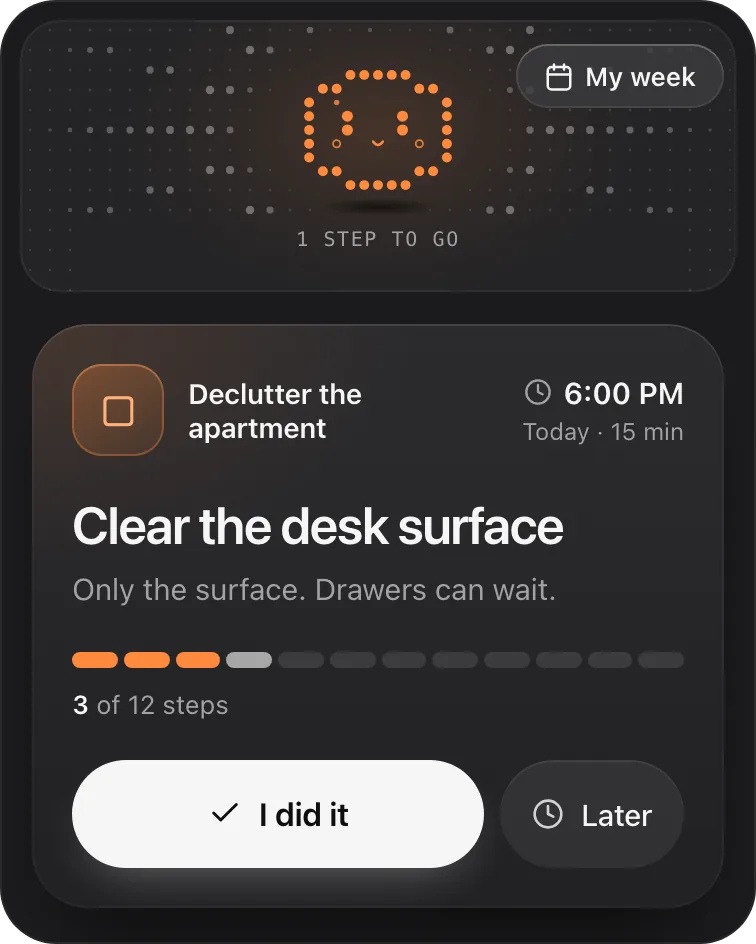
- When you're ready, ask "@Petipa what's my step today?". You see one step with its minutes, and the rest stays out of view.
- Tap I did it when it's done, or Later if today isn't the day. My week shows what's done and what's next this week.
Away for a few days? Nothing is lost. Petipa welcomes you back and you pick up from today. If the plan needs to change, Petipa asks before it changes it.
What it doesn't do: Petipa sends no reminders or notifications, so you choose when to ask. A daily alarm that says "ask @Petipa what's my step today?" covers that. It tracks the steps of your own plan, one at a time; it isn't a shared to-do list or a team project board.
Petipa is in ChatGPT's plugin directory.
Enter a valid email.That didn't go through. Try again in a moment.
Add to ChatGPTQuestions
Can ChatGPT track completed tasks?
It can keep a status table up to date inside a chat when you tell it what's done. Don't count on that status carrying into every future chat: take a short checkpoint with you, or keep the plan in a tool that stores it.
Is ChatGPT's scheduled tasks feature a task tracker?
No. Scheduled tasks are messages ChatGPT sends you at a time you choose, depending on your ChatGPT plan. They don't mark the steps of a plan done.
Can I use a ChatGPT Project as a task tracker?
A Project keeps related chats, files and instructions together, which helps with a long goal. For the check-offs themselves, keep a status table or a checkpoint inside it.
How do I keep my tasks when I start a new chat?
Ask ChatGPT for a checkpoint before you close: the goal, what's done, and the next action with its minutes. Paste it at the top of the new chat.
Does Petipa send reminders?
No. Petipa sends no reminders or notifications; you ask it for today's step when you're ready. A phone alarm can be your cue.