How to keep track of ChatGPT plans across days and chats
Three ways to keep a plan made with ChatGPT going across days and chats, from a one-minute checkpoint to a tracker, and how to pick the one you'll keep using.
The short answer
To keep track of ChatGPT plans, save four things where you can find them: the goal, the steps you finished, your constraints and the next action. A one-minute checkpoint is the simplest method. A ChatGPT Project keeps related chats together for longer work, and a dedicated tracker keeps the check-offs for you.
Why an old chat isn't always enough
Making a helpful plan once is easy. Finding your place in it after several days of other chats is harder. Even when ChatGPT can draw on earlier conversations, it doesn't keep the status of every step as a reliable record.
You don't need to rewrite your whole history. You need a small, current state of the plan.
Method 1: the one-minute checkpoint
At the end of a session, paste this:
I'm stopping here. Make a checkpoint for next time:
Goal: [one sentence]
Done: [only steps I confirmed]
Next: [one action I can start within 10 minutes]
Constraints: [time, dates or changes]
Keep it under 80 words. Don't add a new plan.
Keep the result in a note, or paste it at the top of tomorrow's chat. It's the lightest option when you're following one goal, and it's also the easiest way to continue a ChatGPT conversation in a new chat.
Method 2: use a ChatGPT Project
ChatGPT Projects keep related chats, files and instructions in one place. For a plan that lasts several weeks, a Project makes it easier to find everything. It still doesn't mark steps done, so keep your checkpoint in it.
A useful instruction for the Project:
When we work on this goal, start from my latest checkpoint.
Don't rebuild the whole plan by default.
Ask what changed, then show one next action with its minutes.
Method 3: keep the plan in a separate tracker
If you'd rather open a fresh chat and ask what's next without pasting anything, keep the plan somewhere built to hold it: a doc, a notes app, or an app that stores the steps and what you finished. The tracker holds the record, and ChatGPT stays the place you think the plan through.
Which approach should you choose?
| Situation | A practical choice |
|---|---|
| One quick plan for today | A checklist in the chat |
| One goal over a few days | The one-minute checkpoint |
| A project with research and files | A ChatGPT Project plus a checkpoint |
| A plan over weeks, with check-offs | A tracker that stores the plan |
The best setup is the one you can pick up again without effort. For a status table you can keep inside a chat, see the ChatGPT task tracker guide.
Example: keep a study plan going
Monday: you ask ChatGPT for a seven-day revision plan and finish two 15-minute practice blocks.
Tuesday: no time at all. Instead of letting the plan go quiet, you leave a checkpoint: Finished chapters 1 and 2. Next: answer five questions from chapter 3. Free: Thursday, 15 minutes.
Thursday: your first action is already decided. You start without asking for a new seven-day plan. The ChatGPT study plan prompt builds this kind of plan from the start.
How Petipa keeps track of a ChatGPT plan
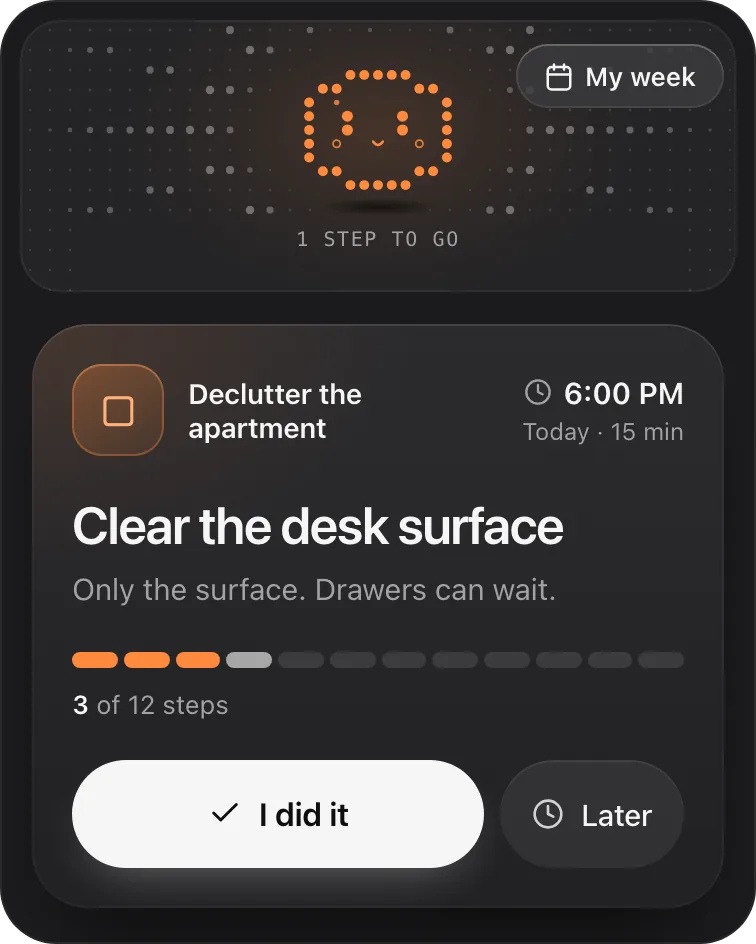
Petipa is an app inside ChatGPT made for method 3. ChatGPT builds your plan; Petipa remembers it after the chat is closed, records the steps you finish, and never stores your conversations. Here's how it works:
- Make the plan with ChatGPT, then say "save it to Petipa".
- In any chat, ask "@Petipa what's my step today?". You see one step with its minutes, with nothing to paste.
- Tap I did it when it's done, or Later if today isn't the day. My week shows what's done and what's next this week.
Away for a few days? Nothing is lost. Petipa welcomes you back and you pick up from today. If the plan needs to change, Petipa asks before it changes it.
What it doesn't do: Petipa sends no reminders or notifications. You come back to ChatGPT and ask for today's step; a phone alarm can be your cue.
Petipa is in ChatGPT's plugin directory.
Enter a valid email.That didn't go through. Try again in a moment.
Add to ChatGPTQuestions
Does ChatGPT Memory save all my plans?
No. Memory can help with relevant details from past chats, depending on your plan and settings, but it isn't a complete record of every step you finished.
Can I keep the same plan in a new chat?
Yes. Paste your checkpoint, work inside the same ChatGPT Project, or keep the plan in a tool that stores the steps.
Does Petipa message me the next day?
No. You come back to ChatGPT and ask Petipa for today's step. If you want a nudge, set a phone alarm.