ChatGPT study plan prompt, and how to stick to it
A prompt that turns your exams and free hours into short study sessions, a quick check that the plan fits your real week, and a calm way to pick it back up after days off.
The short answer
A good ChatGPT study plan prompt gives it your exam dates, your subjects, your weak topics and the hours you really have each day, and asks for short sessions with minutes and a lighter version of each. Check that the plan fits your week before day 1, then do only today's session, not the whole plan.
The ChatGPT study plan prompt
Copy this, fill in the brackets, and send it as one message.
Act as a careful study coach. Make me a study plan.

Exams: [Biology, December 12] [History, December 15] [Math, December 18].
Weak topics: [genetics, the French Revolution, integrals].
Strong topics: [cell biology, algebra].
Time I really have: [45] minutes on weekdays, [2 hours] on Saturday,
none on [Sunday].
How I like to study: [practice questions / flashcards / explaining out loud].

Rules:
- Break the plan into sessions of 25 to 45 minutes, each with one clear task.
- Give every session its minutes, and a lighter 10-minute version.
- Spend more sessions on weak topics, and leave the last two days before each
  exam for review.
- Leave one free day a week with nothing planned, as a buffer.
- Show this week in full. Show later weeks as one short line per day.
- Before you write the plan, ask me up to 3 questions if anything is unclear.
Why each line is there
| Line | What it asks for |
|---|---|
| Exams with dates | A plan that counts back from each exam, so the order makes sense |
| Weak and strong topics | More time where you need it, less where you don't |
| Time you really have | Sessions sized to your week, not to an ideal one |
| How you like to study | Tasks you'll actually do, such as 20 practice questions instead of "revise chapter 4" |
| Minutes and a lighter version | A clear size for each session, and a fallback for tired days |
| A buffer day | Room for the week to go differently, without breaking the plan |
| This week in full, the rest short | Only what you need now, not a wall of text |
| Up to 3 questions | Questions to fill the gaps, instead of guesses |
For a study schedule prompt with fixed classes or work, add a line: "Fixed times I can't study: [Monday 9 to 5, Thursday evening]." ChatGPT then plans around them.
The plan is for studying, not for doing the work for you. Ask ChatGPT to quiz you, explain a topic in a new way, or check your answer, and keep the essays and assignments your own.
Check that the plan fits your real week
ChatGPT can be quick to agree with what you ask, and a plan made in one sitting is easy to size for an ideal week. Before day 1, read this week and check:
- Every session fits in the time you said, on the days you said.
- Each session names one task you could start right away, like "20 integral problems from chapter 6". "Study math" is a topic, not a task.
- Each session has a lighter version.
- The plan leaves a buffer day.
- The last days before each exam are for review, not new material.
Then add up the minutes. If this week asks for more time than you wrote down, it won't hold. Say so in the same chat:
This week adds up to more minutes than I have. Cut it to fit [4 hours]
in total. Keep the weak topics, and drop what matters least.
And ask it to look for problems, since it won't always offer them:
Before I start: what in this plan is likely to be too much for me?
What am I not considering? Suggest changes, but don't rewrite the plan yet.
How to stick to a study plan
The prompt is the easy part. Doing session 9 on a Wednesday, tired, is the hard part. These habits help more than a better plan:
- Look only at today's session. A whole term on one screen looks like a mountain. One 30-minute session looks like an evening.
- Fix a time, not just a day. "Tuesday at 6 pm, at the library" happens. "Tuesday" drifts.
- Use the lighter version instead of skipping. Ten minutes of flashcards still counts, and it keeps the plan moving.
- Start with the first physical step. Open the book to the page, or write the first question down. Our guide on how to start a task covers this.
- Mark what you did. A short list of done sessions is proof you're moving, and it tells you where to pick up.
- Let something remind you. A chat waits for you to open it. A phone alarm works, and so can a ChatGPT scheduled task, depending on your ChatGPT plan.
Many people say the plans that fall apart are the ones with too many steps in view at once. Fewer, clearer sessions tend to last longer than a dense timetable.
Restart after days off, without rebuilding the plan
Most study plans end the same way: a few days off, a plan that no longer matches the calendar, and the urge to start over from scratch. You don't need a new plan. You need the next session.
Don't go back and try to make up every session you skipped. Paste your plan, or go back to the same chat, and send:
I took [4] days off. Don't restart the plan, and don't make me catch up
on everything at once. The exams are still on the same dates.
Re-plan from today: keep the weak topics, drop or shorten what matters
least, and tell me only today's session, with its minutes.
If the gap was long and the exam is close:
My exam is in [6] days and I have about [1 hour] a day. What's the
smallest plan that still covers the topics most likely to matter?
Show me only today's session.
Many people describe coming back as the hard part, more than the studying itself. A plan that picks up from today, with nothing to make up, is easier to return to than one that shows how much is left undone.
One more thing: a plan that lives only in a chat can scroll away, and long chats can lose details. Keep a copy of the plan outside the chat, in a note or a doc. More on that in how to make ChatGPT remember previous conversations.
How Petipa keeps your study plan, one session at a time
Petipa is an app inside ChatGPT that keeps your study plan and shows you one session at a time. ChatGPT still makes the plan with you. Petipa keeps it after the chat is closed, and never stores your conversations. Here's how it works:
- Send the prompt above, check the plan, then say "save it to Petipa".
- Each study day, ask "@Petipa what's my step today?". You see one session, with its minutes.
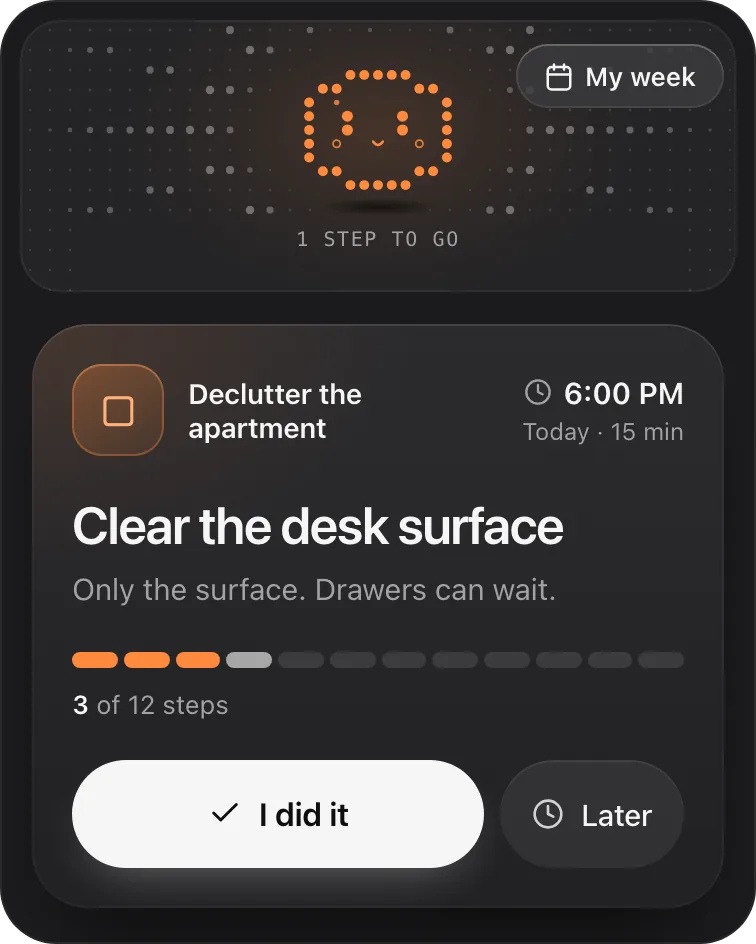
- Tap I did it when it's done, or Later if now isn't the moment. My week shows the sessions done and the ones coming up.
Took a few days off? Nothing is lost. Petipa welcomes you back calmly, and you start from today. If the plan needs to change, Petipa asks before it changes it.
Petipa sends no reminders, and it doesn't sync with your calendar. If remembering to ask is the hard part, set your own phone alarm on study days that says "ask @Petipa what's my step today?". Petipa doesn't quiz you or explain topics either: that part stays in ChatGPT.
The card below comes from a sample decluttering plan. A study plan shows the same way: one session, its minutes, I did it and Later.
Petipa is in ChatGPT's plugin directory.
Enter a valid email.That didn't go through. Try again in a moment.
Add to ChatGPTQuestions
What is a good ChatGPT study plan prompt?
One that gives ChatGPT your exam dates, subjects, weak topics and the hours you really have, and asks for short sessions with minutes, a lighter version of each, and a buffer day. The prompt in this article does all of that.
How do I use ChatGPT to make a study plan?
Send it your exams, topics and free time in one message, let it ask a few questions, then check that this week fits the hours you have before you start.
Can ChatGPT make a study schedule around my classes?
Yes. Add the times you can't study, such as classes or work, and ask it to plan only around them.
How do I stick to a study plan?
Look only at today's session, fix a time for it, use a lighter version on tired days instead of skipping, and mark each session you finish.
What if I skip a few days of my study plan?
Don't start over and don't try to catch up all at once. Ask ChatGPT to re-plan from today with the same exam dates, and do only today's session.
Is using ChatGPT to study cheating?
Using it to plan, quiz you and explain topics is studying. Having it write work you hand in is a different matter, so check your school's rules and keep your assignments your own.