How to resume a ChatGPT plan after a few days off
Pick a ChatGPT plan back up without rebuilding it: check what changed, keep the useful parts, and start again with one step of five minutes or less.
The short answer
If you stopped a ChatGPT plan for a few days, you don't need to rebuild it from zero. Check what changed, keep the useful parts, move or drop the rest, and choose one action of five minutes or less. A small restart is easier to follow than a new, bigger schedule.
Why restarting can feel harder than planning
A plan looks clear on the day you make it. Then work runs late, Tuesday slips by, and suddenly the plan has a backlog. Asking ChatGPT to "catch up" can turn those days into even more tasks.
The aim isn't to squeeze the old calendar into today. It's to keep moving toward the outcome with the time and energy you have now.
The five-minute restart
- Say what happened, without the whole story: "I was away four days."
- Update the constraints. Maybe you now have 10 minutes, not 30.
- Keep, move or drop the remaining steps. Don't stack them all onto today.
- Choose one action you can start today.
- Write down where you stopped, so tomorrow is easier.
Copy this restart prompt
I want to resume a plan I paused.
Goal: [original goal]
Last thing I finished: [what I actually did]
Time away: [number of days]
What changed: [time, energy, dates, priorities]

Don't restart the plan from zero or give me a backlog.
Keep what's useful, move or remove what no longer fits,
and give me one next step that takes 5 minutes or less.
End with one sentence I can save for tomorrow.
Can't find the original plan? Start with the goal and the last thing you remember doing. You don't need a perfect history to take a useful next step.
Example: coming back to a reading goal
The plan said 20 pages every evening. Five evenings went by without reading, and your energy is low.
A catch-up approach says "Read 100 pages this weekend." A lighter approach says "Open the book and read two pages tonight." The second one doesn't promise you'll finish by the original date, but it gets you reading again, and from there you can decide honestly whether the date still works.
What if the deadline no longer fits?
Ask ChatGPT for a reality check:
Given where I am and the time I have, is my deadline still realistic?
If not, show me two honest options: a smaller scope or a later date.
Recommend the one that changes less.
A realistic plan you use beats an impressive one you avoid. If the first step still feels heavy, how to start a task covers the first minute.
Make tomorrow's return easier
Before you stop today, save a one-line checkpoint:
Goal: finish the book. Done: read two pages. Next: read three pages after dinner, 5 minutes.
Put it where you'll see it tomorrow. ChatGPT can pick up from that line in a new chat, and a ChatGPT Project can keep the related chats together. For a plan that lasts weeks, how to track goals with ChatGPT adds a weekly review.
How Petipa helps you pick a plan back up
For people who keep losing their place, Petipa is an app inside ChatGPT that keeps the plan and what you finished outside the chat. ChatGPT helps you make the plan; Petipa remembers it after the chat is closed, and never stores your conversations. Here's how it works:
- Make the plan with ChatGPT, then say "save it to Petipa".
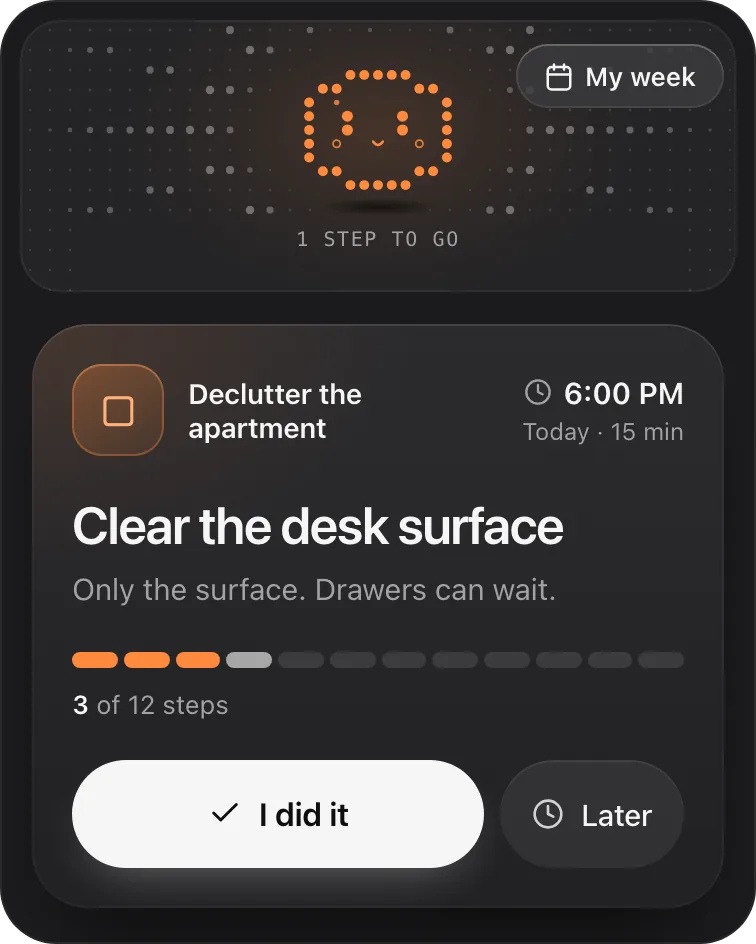
- When you come back, ask "@Petipa what's my step today?". You see one step with its minutes.
- Tap I did it when it's done, or Later if today isn't the day. My week shows what's done and what's next this week.
Away for a few days? Nothing is lost, and there's no streak to break. Petipa welcomes you back calmly and you pick up from today. If the plan needs to change, Petipa asks before it changes it.
What it doesn't do: Petipa sends no reminders or notifications, so coming back is still up to you. A phone alarm that says "ask @Petipa what's my step today?" helps. It only counts the steps you mark done.
Petipa is in ChatGPT's plugin directory.
Enter a valid email.That didn't go through. Try again in a moment.
Add to ChatGPTQuestions
Do I need to do everything I skipped?
No. Look again at which steps are still useful, then move or drop the rest.
What if I feel stuck again tomorrow?
Make the step smaller. "Open the document" is a fine first step when writing a page feels too big.
Can ChatGPT resume the exact same plan?
It can, if you give it the current status: paste your checkpoint or the last thing you finished. For a reliable status over weeks, keep a checkpoint or use a tracker that stores the plan.