How to make ChatGPT remember previous conversations
What ChatGPT's memory keeps, why long chats lose the thread, and five fixes you can use today.
The short answer
to make ChatGPT remember previous conversations, turn on Memory (Settings, then Personalization) and tell it what to keep: "Remember that…". Depending on your plan, it can also draw on past chats. Use a Project for long work, and restart long chats with a summary. Memory keeps facts, not your progress on a plan.
Does ChatGPT remember previous conversations?
Yes, in part, when Memory is on. Depending on your plan and region, ChatGPT can draw on a few sources:
- Saved memories. Details you ask it to remember, and details it decides are useful. You can see them, correct them and delete them.
- Past chats. With Reference chat history on, ChatGPT can use relevant details from earlier conversations without you saving anything. You can turn it off.
- Custom instructions. What you tell ChatGPT about yourself and how you want answers. They apply to every chat.
OpenAI says memory doesn't keep every detail from every conversation. ChatGPT picks what seems relevant to each answer, and what it remembers can change over time. How much memory you get also depends on your plan.
To see your controls, open Settings, then Personalization, then Memory. What you find there depends on your version of memory: some accounts show a memory summary you can correct, others a list of saved memories. You can also just ask ChatGPT what it remembers about you.
What doesn't get carried over:
- Temporary Chats never add to memory. Before you send the first message, you choose Personalized, which can use what ChatGPT already remembers, or Unpersonalized, which doesn't. Either way, nothing new is saved while the chat stays temporary.
- With Memory off, new chats don't draw on what ChatGPT remembered. Custom instructions have their own on and off switch in Settings.
| Saved memories | Past chats | Temporary Chat | |
|---|---|---|---|
| What it is | Details kept on purpose | Relevant details from earlier chats | A chat that stays out of your history |
| What you control | See, correct or delete each one | Turn it on or off, correct what it remembers | Personalized or Unpersonalized, chosen before you start |
| Adds to memory | Yes | Yes | No, unless you save the chat |
| Best for | Stable facts: your goal, your schedule, your preferences | Context that builds up over time | One-off or private questions |
Why ChatGPT forgets earlier messages in the same chat
This is a different problem from memory, and the two often get mixed up.
ChatGPT can only work with a limited amount of a conversation at once, and how much depends on your plan. In a very long chat, the earliest messages can drop out of view. The instructions you gave at the start are still on your screen, but ChatGPT may no longer be using them.
The signs are easy to spot:
- It asks for something you already told it.
- It ignores a rule you set at the beginning ("keep answers short").
- It mixes up details from early in the chat.
The fix is not more memory. It's a shorter chat, with the important parts brought forward (fix 4 below).
How to make ChatGPT remember things: five fixes
1. Save what matters, on purpose
Don't hope ChatGPT notices. Tell it, in one clear sentence:
Remember that I'm training for a 10K in March, and I run on Monday,
Wednesday and Saturday mornings.
Good memories are short, specific and still true next month. "I prefer short answers" is a good memory. "I'm tired today" isn't.
To check what it kept, ask "What do you remember about me?", or open Settings, then Personalization, then Memory. If something is wrong or out of date, tell ChatGPT or delete it, because it will keep using it.
Leave out anything you wouldn't want brought up later. Memory can hold sensitive details if you share them.
2. Tidy up when memory is full or stale
Depending on your plan, ChatGPT may manage saved memories for you, keeping the most relevant ones up front and moving the rest to the background. That makes a full memory less common.
If you do see a notice that memory is full, or ChatGPT keeps using something old, open Settings, then Personalization, then Memory, and delete what you no longer need: old projects, duplicates, one-off facts. Then save the important things again, one clean sentence each.
3. Give big work its own Project
A Project keeps chats, files and instructions in one place, and the chats you start inside it can use them. It's the best home for anything bigger than one conversation: a plan, a course, a job search.
- Put the full plan in the Project as a file, or in the Project's instructions (the ••• menu, then Project settings).
- When ChatGPT writes something worth keeping, open the menu on that reply and choose Add to project sources.
- Start every related chat from inside that Project.
When you create a Project, and depending on your memory settings, you can also choose project-only memory, so its chats draw on each other and not on the rest of your ChatGPT. You can change this later in Project settings.
4. Restart long chats with a summary
When a chat gets long, don't keep pushing. Ask for a handover, then start fresh:
Summarize this chat for a new conversation in 10 lines or fewer:
the goal, what we decided, what's done, what's next, and any rules
I gave you.
Paste that summary as the first message of a new chat. You keep what matters and lose the clutter. If you work in a Project, add the summary to the Project's sources so the next chat can find it.
5. Put your standing rules in the right place
For a rule that should hold everywhere ("keep answers short", "no more than three steps"), use custom instructions: on the web, Settings, then Personalization; in the phone app, Settings, then Customize ChatGPT. They apply to every chat.
For the one rule that has to hold right now ("nothing over 20 minutes"), put it in the message you're sending, not only in the first message of the chat.
Memory, Projects or scheduled tasks: which one keeps a plan?
ChatGPT has three features that sound like they could hold a plan: memory, Projects and scheduled tasks. Each one keeps something different.
| Keeps the plan's text | Knows what's done | Picks today's step | |
|---|---|---|---|
| Saved memories | Only a short version | Only if you tell it each time | No |
| A Project | Yes, as files or instructions | Only if you update it | No, you ask each time |
| A scheduled task | Only what you put in its prompt | No | No |
| A summary you paste back | Yes | Yes, as of the summary | No |
| An app made for plans | Yes | Yes, as you mark steps done | Yes, one step at a time |
As of October 2026, Projects are included on every ChatGPT plan when you're signed in, and how many files a Project holds depends on your plan. Scheduled tasks reach you by push or email, and eligible users get them on every plan, Free included. How many you can have depends on your plan; on the Free plan, each one runs at most once a day. Tasks don't work with GPTs.
For a plan, two of these usually do the job: memory for the facts that don't change, and one place that holds the plan itself. That's a Project if you're happy to update it by hand, or an app made for plans if you'd rather mark steps done as you go. A scheduled task can remind you each day to open it.
For the full daily routine, with a Project, an end-of-day recap and a daily reminder, see ChatGPT daily planner: how to plan your day, and keep the plan tomorrow.
If your plan lives in a custom GPT, move it soon. Custom GPTs retire on December 11, 2026 (some Enterprise workspaces get more time), and after that the GPT can't be opened, though your past conversations stay. See Custom GPTs are going away: what to do by December 11.
What memory doesn't do: keep a plan moving
Memory is built for facts. A plan has state: which steps are done, which moved, what's next today. Memory can hold "I'm training for a 10K". It isn't designed to hold "Tuesday's run is done, Thursday moved to Friday, today is a rest day".
Many people who plan with ChatGPT describe the same pattern: memory holds a few stable facts well, but a growing to-do list slips, items drop without a word, and they end up reminding it. The usual fix is a master list in a doc that you paste back in. It works, but keeping that list current and briefing ChatGPT every day becomes a job of its own.
So even with every fix above, you're still the one who opens the plan, works out where you are, and picks today's step. That daily decision is often where a plan stalls.
Keeping a plan going with Petipa
Petipa is an app inside ChatGPT (a plugin) that keeps your plan, so ChatGPT doesn't have to remember it. ChatGPT makes the plan; Petipa keeps it and shows you today's step.
- Ask ChatGPT for a plan, or paste one you already have, and say "save it to Petipa".
- Each day, ask "@Petipa what's my step today?". You get one step, with its minutes, and two buttons: I did it and Later.
- My week shows what's done and what's next.
Because the plan lives in Petipa, a long chat, a new chat or Memory being off doesn't lose it. Away for a few days? Petipa welcomes you back, and nothing is lost: start from today, or make the plan lighter.
What it doesn't do: Petipa sends no reminders, so you still start the check-in yourself. A daily phone alarm that says "Ask @Petipa what's my step today?" covers that.
Petipa keeps your plans, steps and checks. It doesn't store your conversations.
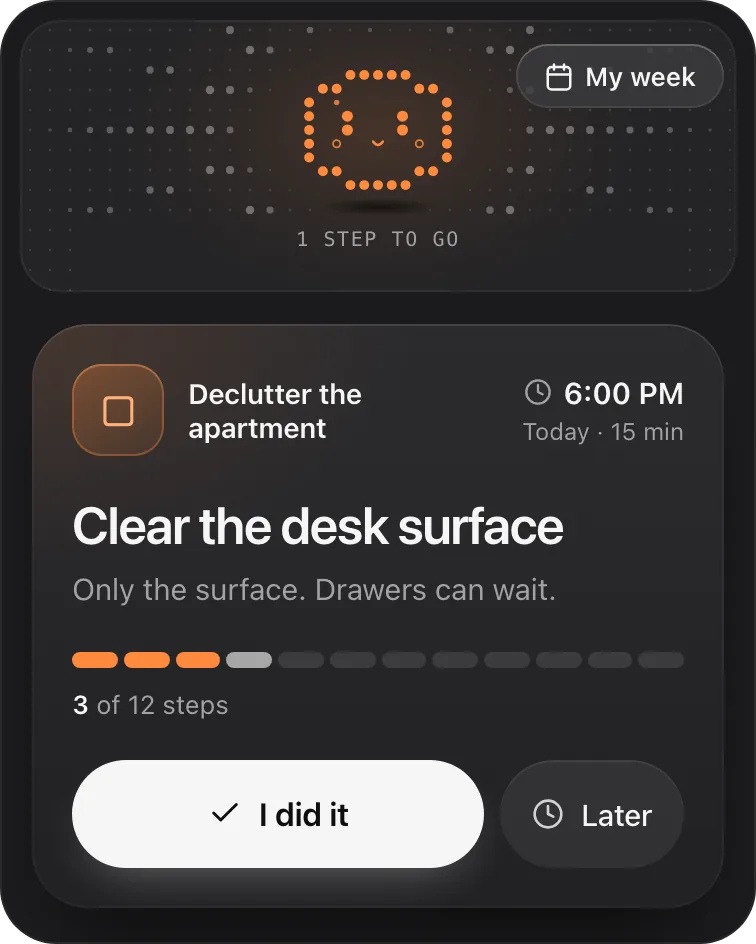
Petipa is in ChatGPT's plugin directory.
Enter a valid email.That didn't go through. Try again in a moment.
Add to ChatGPTQuestions
Does ChatGPT remember across chats?
It can. With Memory on, ChatGPT can use your saved memories and, depending on your plan and settings, relevant details from past chats. It doesn't keep every detail. A Temporary Chat adds nothing to memory while it stays temporary.
Does ChatGPT remember deleted chats?
Deleting a chat doesn't necessarily delete a saved memory that came from it. To remove something, delete the saved memory (Settings, then Personalization, then Memory) and the chat where you shared it, including archived copies. It can take a while for the change to show.
How do I make ChatGPT remember everything?
You can't, and you wouldn't want to: OpenAI says memory doesn't keep every detail, and old details crowd out useful ones. Save the few facts that matter, keep big work in a Project, and start long chats again from a summary.
Why does ChatGPT forget things in a long chat?
It can only work with a limited amount of a conversation at once. In a very long chat, the earliest messages can fall out of view. Start a new chat with a summary of what matters.
How do I save memories in ChatGPT?
Write "Remember that…" followed by one clear sentence. To check it, ask ChatGPT what it remembers about you, or open Settings, then Personalization, then Memory.
What happens when ChatGPT's memory is full?
Depending on your plan, ChatGPT may manage saved memories automatically, keeping the most relevant ones up front, so a full memory is less common. If you see that it's full, delete what you no longer need in Settings, then Personalization, then Memory.
Can ChatGPT keep track of my plan?
It can hold the plan's text in memory or a Project. Keeping track of what's done, and picking one step each day, needs somewhere that stores your progress: a summary you update yourself, or an app made for plans.