Waiting mode ADHD: what it is and how to get out of it
What waiting mode is, and how to get the hours before an appointment back: alarms you set yourself, steps that fit the gap, and an easy restart after.
The short answer
Waiting mode is what many people with ADHD call the stuck feeling before something later in the day: a 3 pm call, and the morning goes to clock-watching. It's a term people use, not a diagnosis. To get out, set alarms for when to stop, get ready and leave, then fill the gap with short steps you can finish.
What is waiting mode?
Waiting mode is the name people gave to a common pattern: you have one thing later in the day, like an appointment, a call or a school pickup, and you can't get anything done until it's over. The appointment might be hours away. It still takes over the time before it.
It isn't a clinical term or a diagnosis. The name spread in ADHD communities, and many people with ADHD describe it, but plenty of people without ADHD recognize it too. You don't need a label for the steps below to help.
The same thing happens with waits that have no fixed time: a call "sometime this afternoon", a delivery window, a reply you're waiting on. For some people it stretches over days, before a trip or a big event.
What waiting mode feels like
People describe it in much the same way:
- Checking the clock again and again, and working out how much time is left each time.
- Re-checking the details: the address, the route, the time, the papers to bring.
- "Not worth starting": any real task feels like it will get cut off, so nothing begins.
- Filling time instead of using it: scrolling, small tidying, standing near the door.
- The day feels gone, even when the appointment itself took twenty minutes.
Many people say the hard part comes afterward: a whole day spent on one short event, and the sense of having wasted it. That's a common feeling, and it says nothing about you. Waiting mode is a planning problem, and it has planning answers.
Most advice on waiting mode is about avoiding it next time. That helps, and it's further down. First, what to do if you're stuck in waiting mode right now.
How to get out of waiting mode when you're already in it
Five steps, in order. The first two take a few minutes and do most of the work.
1. Work back from the appointment and set your alarms
Part of what keeps people stuck, by their own account, is the worry of losing track of time and being late. Give that job to your phone.
Start from the appointment and count back. For a 3 pm appointment:
- Travel, with a buffer: 30 minutes, so leave at 2:30.
- Getting ready (shoes, bag, papers): 15 minutes, so get ready at 2:15.
- A soft stop for whatever you're doing: wrap up at 2:00.
Set three phone alarms, each labeled with what to do: "Wrap up", "Get ready", "Leave now". Only turn an alarm off once you've started what it says. Now you don't have to watch the clock. The alarms will tell you, and everything before 2:00 is yours.
2. Write down what the appointment needs, once
Many people describe going over the details again and again. Put them in one note instead: the time, the address, what to bring, the question you want to ask. Put the papers or the bag by the door now. The note holds the details, so you don't have to.
3. Pick steps that fit the gap and can be finished
The "not worth starting" feeling tends to stick to big tasks with no clean end. So pick steps that have one: one drawer, one email, one load of laundry into the machine. A finished step is a good place to stop, so the first alarm never cuts off something half done.
A rough guide to what fits:
| Time before your wrap-up alarm | What fits |
|---|---|
| Under 30 minutes | One small step: an email, the dishes, a short walk |
| 30 to 90 minutes | Two or three short steps, each 25 minutes or less |
| Half a day | One real block of work with a clear stopping point, then short steps |
| A full morning and more | Plan the morning like any other morning, and keep the last hour light |
Keep a short "fits anywhere" list for days like this: tasks of 5, 10 and 20 minutes with no deadline. When waiting mode starts, you choose from the list instead of deciding from scratch.
4. Start with the smallest part
If even a short step won't start, make it smaller: open the email, take one thing out of the drawer, put the laundry in the machine. Two minutes counts, and after that you're allowed to stop. Often one step leads to a second. If it doesn't, you've still used the gap. For more on getting past a freeze at the start, see how to start a task.
5. Or rest on purpose
Not every gap has to be productive. If you'd rather rest before the appointment, choose it: a show, a walk, a nap with an alarm. Rest you chose feels different from an hour spent waiting, even if it looks the same from the outside.
A ChatGPT prompt for the hours before an appointment
If working out the times and the steps is the part you can't face, hand it to ChatGPT. Copy this, fill in the brackets, and send it:
I'm stuck in waiting mode. I have [appointment] at [time].
It takes me [minutes] to get there and [minutes] to get ready.
It's [time now].

1. Work back from the appointment and give me three alarm times
   to set on my phone: wrap up, get ready, leave. Add a small
   buffer to the travel time.
2. Here's what I could do today: [tasks, in any order].
   Pick steps that fit before my wrap-up alarm, each 25 minutes
   or less, each one I can finish and walk away from.
3. Show me only the first step, with its minutes. When I say
   "done", give me the next one. If I say "stop", tell me it's
   fine to rest until the alarm.
Then set the alarms on your phone yourself, and check the times against your own sense once. ChatGPT can get times wrong, and an alarm is only as good as its math.
For a wait with no fixed time, like a call or a delivery "sometime this afternoon":
I'm waiting for [a call / a delivery] sometime between [time]
and [time], and I can't settle into anything. Give me steps of
10 minutes or less that I can drop the moment it comes, and that
I can do near [my phone / the door]. Show me one at a time.
How to avoid waiting mode next time
- Book appointments early in the day when you have the choice. A 9 am appointment leaves the rest of the day open; a 3 pm one can take the whole morning with it.
- Group appointments and errands on the same day, so fewer days have a gap in them.
- Plan appointment days as half days. One or two small steps before, nothing big. A light plan you finish is better than a full plan the wait swallows.
- Set the alarms the night before, so you wake up with the timing already handled.
- Keep the "fits anywhere" list going, and add to it whenever a small task comes up.
- Learn how long things take. Note how long getting ready and getting there really took, and use those times next time.
After the appointment: getting the day back
Many people describe a second stuck stretch after the appointment: the energy is gone and the day feels used up. Two things help.
- Choose one step for afterward before you leave. Write it where you'll see it when you get home, like a note on the table. Coming back to a clear, small next step is easier than deciding from scratch.
- Let a waiting day count as a day. If the whole day went to the wait, that's all right. Tomorrow starts from the next step, not from a catch-up list of everything that didn't happen.
To plan tomorrow around its fixed times, the ChatGPT daily planner has prompts to copy.
How Petipa helps on a waiting day
The steps above work with a phone alarm, a note and ChatGPT. Petipa helps when the steps belong to a bigger plan that runs over days or weeks, like clearing out the apartment or studying for an exam. Petipa is an app inside ChatGPT that keeps that plan after the chat is closed, and it never stores your conversations. Here's how it works:
- Make the plan in ChatGPT, check it, then say "save it to Petipa".
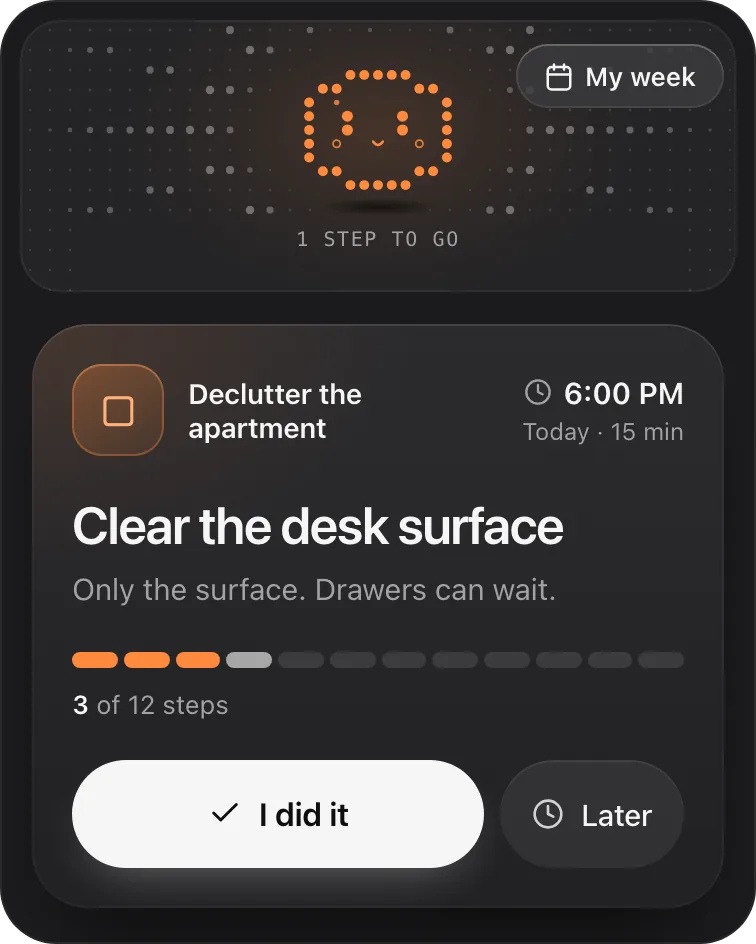
- On a waiting day, ask "@Petipa what's my step today?". You see one step with its minutes, so you can tell at a glance whether it fits before your first alarm.
- Tap I did it when it's done, or Later if it doesn't fit today. My week shows what's done and what's coming up.
If waiting mode takes a few days, nothing is lost: Petipa welcomes you back, and you start again from today. If the plan needs to change, ChatGPT proposes the change and Petipa saves it only after your yes.
What it doesn't do: Petipa doesn't know your appointment times, since there's no calendar sync, and it sends no reminders. The alarm you set on your own phone is the reminder.
Petipa is in ChatGPT's plugin directory.
Enter a valid email.That didn't go through. Try again in a moment.
Add to ChatGPTQuestions
What does waiting mode mean?
Waiting mode means not being able to start anything because something is coming up later, like an appointment, a call or a pickup. The time before it goes to waiting, even when there's plenty of it.
Is waiting mode an ADHD thing?
It isn't a clinical term or a diagnosis. It's a name people gave to a common experience. Many people with ADHD describe it, and so do people without ADHD.
Can you have waiting mode without ADHD?
Yes. People without ADHD describe the same stuck feeling before an appointment. The ways out are the same for everyone: alarms you set, steps that fit the gap, and a small plan for afterward.
How do I get out of waiting mode?
Work back from the appointment and set alarms for when to wrap up, get ready and leave. Then pick one short step you can finish before the first alarm, and start with the smallest part of it.
What should I do while waiting for an appointment?
Short steps you can finish, from a list you keep for these days: an email, one drawer, a short walk. Or rest on purpose until your alarm. Both beat an hour of checking the clock.
Why can't I do anything before an appointment?
Many people describe two things at once: a worry about losing track of time, and a feeling that anything they start will get cut off. Alarms handle the first, and small steps with a clean end handle the second.
Is waiting mode anxiety?
Waiting mode is an everyday term, not a diagnosis. People often describe a low worry that comes with it, mostly about being late or forgetting something, and writing the details down and setting alarms takes some of that off. If worry gets in the way of daily life, talk to someone you trust or a professional.