Custom GPTs are going away: what to do by December 11
What changes on December 11, what to save now, and what can replace the GPTs you rely on.
The short answer
Yes, custom GPTs are going away. OpenAI's help center says they retire on December 11, 2026, on every ChatGPT plan. After that, GPTs can't be opened, but past chats with them stay. If you built one, you can migrate it to a plugin once that option reaches your account. If you use someone else's, that's up to its creator.
Dates from OpenAI's help center, as of October 24, 2026. If a notice in your account gives a different timeline, follow the notice. Read OpenAI's FAQ.
Are custom GPTs going away?
Yes. OpenAI is retiring custom GPTs and helping creators move them to plugins. OpenAI describes plugins as a way to bring reusable instructions, reference files and connected apps together in ChatGPT. You find them under Plugins in ChatGPT's sidebar, and you can call an installed one in a chat with an @ mention.
| Date | What happens |
|---|---|
| Now until December 11, 2026 | Existing GPTs keep working |
| December 11, 2026 | Custom GPTs retire: GPTs and their pages can't be opened. Past conversations stay |
| February 11, 2027 | Retirement only for Enterprise workspaces with an approved deferral |
The change affects every ChatGPT plan, but when migration reaches you, and whether you have plugins, can differ by account or workspace. A GPT follows the dates of the account or workspace where it was made. If you use ChatGPT through work, check with whoever runs your workspace.
What happens to my GPTs?
It depends on whether you built the GPT or just use it.
| You built the GPT | You use someone else's GPT | |
|---|---|---|
| Can you move it? | Yes, with Migrate to plugin under My GPTs, once it's offered for your account | No. Using a GPT doesn't let you migrate it |
| What moves over | Under OpenAI's planned workflow: its instructions, its knowledge files (as the plugin's reference files) and its connected apps | Nothing moves to you by itself |
| What doesn't | Custom actions, the model you picked, sharing settings, and drafts or unpublished edits | Your access: using the GPT doesn't give you the creator's new plugin |
| After migrating | The original stays usable until December 11, but read-only, and you can't delete it | You'd use the creator's plugin, if it's made available to you |
| What to do now | Publish your final edits, then migrate and test | Check the GPT's notice, save what you need, and look at the alternatives below |
Four details catch people out:
- Publish before you migrate. Migration copies the GPT's latest published version, so drafts and unpublished edits don't move over. Publishing doesn't mean sharing it publicly.
- The original freezes. After migration it's read-only, and future changes happen in the plugin.
- Actions need rebuilding. Custom actions don't transfer. If your GPT calls an outside service, first check whether an existing app covers the job. Rebuilding the connection yourself can take technical setup.
- The plugin starts private. It isn't installed for anyone, and your GPT's users don't get access to it. Making it public is a separate plugin submission.
"This plugin isn't available to you"
If you open a GPT and see "This plugin isn't available to you. You can keep using this GPT until December 11," its creator has most likely migrated it, and the new plugin hasn't been shared with you. Access to a GPT doesn't carry over to its plugin. Keep using the GPT until then, and ask its creator where the replacement is. What the message means and what to do.
A checklist before December 11
Use this whether you built GPTs or only use them.
- List the GPTs you rely on. For each one, note the job it does for you and whether you built it.
- Copy what you still use. For your own GPTs, copy the instructions into a document, and save a few prompts you use often so you can compare the replacement against them. For any GPT, copy out the plans, notes and outputs you still need.
- Request a data export early. On a personal account, go to Settings, then Data controls, then Export data. OpenAI says the export arrives by email or text and can take up to 7 days, and the download link expires 24 hours after it arrives. In a Business or Enterprise workspace, ask the workspace owner instead.
- Rebuild the habit without the GPT. For many personal GPTs, a Project with the same instructions can do a similar job. Create a project, open its menu, choose Project settings, and paste the instructions in. Add the reference files you used. Chats you had with a GPT can't be moved into a Project, so start new chats there.
- Keep the rebuild small. What a GPT really saved you was explaining yourself again each time. Many people who plan with ChatGPT describe that re-explaining as the tiring part, and some drop an elaborate setup that never quite feels right. A few lines of instructions you actually use will serve you better than a long copy of the old one.
- Move one GPT at a time. Many people describe dropping a system after a gap or a change of tools, so start with the GPT you use most, use its replacement for a few days, then move the next.
- If you built a public GPT, migrate when it's offered, rebuild any actions, and test with your saved prompts. Your users won't see the new plugin until it's made available to them, which for a public GPT is a separate plugin submission, so tell them where to find it once they can.
Custom GPT alternatives
What replaces a GPT depends on what it did for you.
| Your GPT was… | Closest option now |
|---|---|
| Your own instructions for a kind of task (a writing style, a tutor, a coach) | A Project with the same instructions |
| A GPT you built and shared with others | Migrate it to a plugin when offered, then make it available to your users, which for a public GPT means a separate plugin submission |
| A GPT connected to outside tools through actions | An existing app that covers the job, or a plugin with the connection rebuilt |
| A planner that kept you going on a goal | Plan in regular ChatGPT, and keep the plan in a plugin made for following one |
If you used a GPT to plan your goals
A planning GPT was good at one part of the job: turning a goal into a plan, in the style you liked. That part doesn't go anywhere. Regular ChatGPT can still make the plan, especially with your old instructions in a Project.
The hard part was always what comes after the plan: knowing where you are, picking today's step, and getting going again after a few days off. A chat isn't built to hold that. The plan scrolls up and away, and many people who plan with ChatGPT describe its memory keeping a few stable facts well but losing track once a task list keeps growing (why ChatGPT forgets). What memory keeps also depends on your plan and settings.
That's the part Petipa is for. Petipa is an app inside ChatGPT, built as a plugin: ChatGPT makes the plan, and Petipa keeps it and shows you one small step at a time.
- Paste the plan from your GPT into a chat, or ask ChatGPT for a fresh one. Say "save it to Petipa".
- Each day, ask "@Petipa what's my step today?" You get one step, with its minutes.
- Tap I did it when you're done, or Later. My week shows what's done and what's next.
If you step away for a few days, Petipa welcomes you back calmly, with nothing lost: start again from today, or make the plan lighter. ChatGPT proposes any change, and Petipa saves it only after your yes. Petipa doesn't copy or import a GPT. Your plan moves through the chat, in your own words.
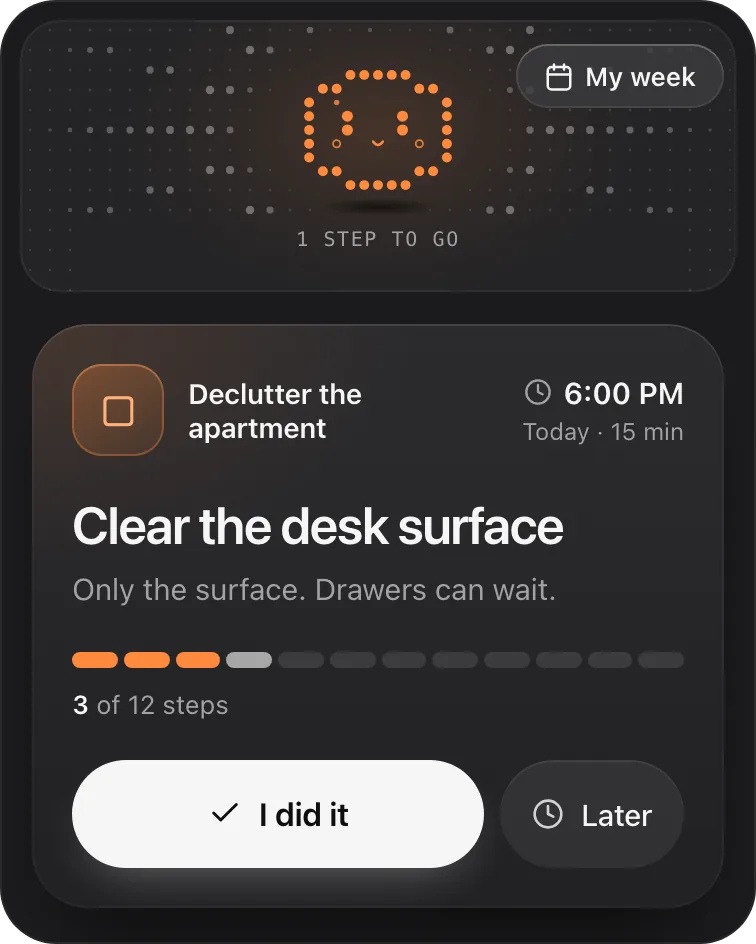
Petipa is in ChatGPT's plugin directory.
Enter a valid email.That didn't go through. Try again in a moment.
Add to ChatGPTQuestions
When do custom GPTs stop working?
OpenAI's help center says December 11, 2026, on every plan. Only Enterprise workspaces with an approved deferral get until February 11, 2027. If a notice in your account gives a different timeline, follow the notice.
Can I still use my GPTs until then?
Yes. Existing GPTs keep working until the retirement date. A GPT you've migrated becomes read-only, but stays usable until then.
Should I build a new custom GPT now?
It would retire on December 11 with the rest. For Enterprise workspaces, OpenAI plans to end the creation of new GPTs on October 26, 2026. For something new, a Project with your instructions is the safer place to start.
What replaces custom GPTs?
OpenAI points creators to plugins, which bring instructions, reference files and connected apps together. For a personal GPT, a Project with the same instructions is often the simplest swap.
Can I migrate someone else's GPT?
No. Only its creator can, or a workspace admin in an Enterprise workspace. If you rely on someone else's GPT, check its notice for a replacement, save what you need from it, and set up your own Project.
What's the difference between plugins and GPTs?
A custom GPT is a version of ChatGPT with its own instructions, files and, sometimes, actions. A plugin is a package that can bring instructions, reference files and connected apps together, and it's what OpenAI offers creators in place of GPTs. A migrated plugin may answer differently, so test it with prompts you know.
Will I lose my chats with a GPT?
No. OpenAI's FAQ says your past conversations with custom GPTs stay accessible after retirement, with nothing to do on your part. If you want your own copy, request an export from Settings, under Data controls.