Time management for ADHD: plan the day in minutes, not hopes
Plan the day in minutes, not hopes: give each step its time, build around what can't move, leave room for the day to change, and start again from today when it does.
The short answer
Time management for ADHD works best when time is made visible and the day is sized to it. Give every step its minutes, put fixed times in first, plan fewer things than feel possible, add buffers, keep one step in view, and look at the week once. When a day slips, restart from today, not from the pile.
Why time management feels so hard with ADHD
Most time management advice assumes you can feel time passing and guess how long things take. Many adults with ADHD describe the opposite: an hour that felt like ten minutes, a "quick" task that took the afternoon, a deadline that felt far away until it was tomorrow. "Time blindness" is the name many people use for this. Some put it as two kinds of time: now, and everything else, which can feel unreal until it arrives.
Some people also describe an appointment later in the day swallowing the hours before it. Starting anything feels risky, so the morning goes by in waiting.
So the answer usually isn't trying harder to feel time. It's moving time out of your head and onto something you can see: minutes written next to each step, fixed times on a page, a clock or timer in view. The seven strategies below do that, and they work with paper, a calendar app or ChatGPT.
7 time management strategies for adults with ADHD
1. Give every step its minutes, then check them
Write a time next to every task, even a rough one: "Reply to the landlord, 10 min." A task with minutes is a known size, and many people find a known size easier to start than a vague one.
Then check. For a week, write your guess before a task and the real time after:
| Task | My guess | Real time |
|---|---|---|
| Reply to the landlord | 10 min | 25 min |
| Clear the kitchen counter | 15 min | 12 min |
| Pay the phone bill | 5 min | 20 min (password reset) |
Many people find a pattern, like guessing low on anything that involves email or a login. That pattern is your correction: plan with your real numbers, not your hopes.
2. Put fixed times in first
Start each plan with what can't move: work hours, appointments, school pickup, the commute, meals. Write them down before any task. What's left is the time you really have, and it's often less than it looked. Plan tasks only into that time.
Keep fixed appointments in one calendar or paper planner, the one you already look at every day.
3. Plan fewer things than feel possible
Add up the minutes on today's list and compare them with your free time. If the list is bigger, cut it in the morning, not at 9 pm. A useful default: three things a day, one of them small, and some time left unplanned.
A day that fits is a day you can finish. Finishing is what makes tomorrow's plan feel believable.
4. Add buffers between things
Things run over, and moving from one thing to the next takes time too. Leave a gap after each fixed time. For anything outside the house, work backward: travel time, plus time to get ready, plus a buffer. Set the alarm for when to start getting ready, not for when the appointment starts.
5. Make time visible
Put time where you can see it: a clock in view of where you work, a visual timer that shows the minutes running down, a phone timer for the step you're on. Label each alarm with what comes next ("Leave for the dentist"), so it tells you what to do, not just that time passed.
If you tend to lose hours in an interesting task, set a stop alarm before you start. Some people find ChatGPT itself is one of those places: the chat keeps going as long as you do. Decide what you came for, get it, and close the chat.
6. Keep one step in view
A full list in front of you makes every task compete for the same minute. Keep the whole list somewhere you don't have to look at it, and put only the next step in view: on a sticky note, at the top of the page, or on a timer label. When it's done, pick the next one. If the next step won't start, our guide on how to start a task covers the first few minutes.
7. Look at the week once
Once a week, take ten minutes: write the week's fixed times, pick up to three priorities, give their steps minutes, and make one day lighter. A weekly look catches what a daily list can't, like the dentist on Thursday that takes the afternoon. The ChatGPT weekly planner has a Sunday prompt for it.
When the day slips: restart from now
Every plan meets a day that goes sideways. The usual reflex is to fit everything that didn't happen into tomorrow, which makes tomorrow too big as well. Try this instead:
- Look at the clock and how much of today is left.
- Pick one step that fits in that time, the smallest useful one.
- Move the rest to a "later" list. No catching up.
- Tomorrow, plan from your real free time again.
After days away, the same rule holds: start from today, not from where the old plan wanted you to be. A plan lasts when coming back to it is easy.
ADHD time management tools
You don't need a special app. Pick one or two of these and keep them simple:
| Tool | What it helps with | Keep in mind |
|---|---|---|
| A clock in view | Noticing time pass | Put it where your eyes already go |
| A visual timer | Seeing a step's time run down | Use it for one step, not the whole day |
| Phone alarms with labels | Moving from one thing to the next | Name the next action, not just the time |
| A calendar app or paper planner | The fixed times you can't move | One place only, checked daily |
| A guess-and-real log | Learning how long things really take | A week is often enough to see a pattern |
| ChatGPT | Sizing the day and breaking down steps | Its estimates are a starting guess |
If you're choosing a planner, what to look for in an ADHD planner covers paper, apps and ChatGPT.
A ChatGPT prompt that sizes your day to the time you really have
Copy this, fill in the brackets, and send it as one message:
Help me plan today so it fits the time I really have.

Fixed times today: [9 to 12 work, 3 pm dentist, 6 pm dinner]
Free time I really have: [about 2 hours, mostly after 1 pm]
On my mind: [everything, in any order]

Rules:
- Give every task a time in minutes. If you're unsure, guess higher.
- Add a 15-minute buffer after each fixed time.
- Plan only into my free time, and leave at least 20 minutes empty.
- If it doesn't fit, pick what matters most today and put the rest
  on a "later" list. Don't squeeze it in.
- Put the first step at the top, small enough to start in 5 minutes.
- Show the day as a short list with start times. Keep it short.
ChatGPT tends to agree with whatever you give it, so check the plan before you start:
Look at this plan again. Where am I most likely to run out of time?
What am I not considering? Don't rewrite it yet.
When the day changes:
It's [time]. Done: [list]. Didn't happen: [list].
Re-plan only the time left today. Don't fit in everything, and
don't comment on what didn't happen. Show me the next step only.
Treat ChatGPT's times as a first guess, not a measure of how long things take you. Many people who plan with ChatGPT say an estimate helps mostly because a dreaded task suddenly looks small enough to start. Whether the number is right, only your clock can tell, so compare it with your guess-and-real log.
Keep the plan somewhere outside the chat too. When Memory is on, ChatGPT can remember relevant details from your chats, but it doesn't keep every detail of every conversation, and what's available depends on your plan and settings.
How Petipa keeps the minutes in front of you
The strategies above work on paper. What they ask of you is carrying the plan from one day to the next. Petipa is an app inside ChatGPT that does that part: ChatGPT makes the plan with you, Petipa keeps it after the chat is closed, and it never stores your conversations. Here's how it works:
- Make a plan in ChatGPT with steps in minutes, check that it fits, then say "save it to Petipa".
- Each day, ask "@Petipa what's my step today?" You see one step with its minutes, and the rest stays out of view.
- Tap I did it when it's done, or Later if now isn't the moment. My week shows what's done and what's coming up this week.
Away for a few days? Nothing is lost: Petipa welcomes you back and you start from today. If the plan needs to change, ChatGPT proposes it and Petipa saves it only after your yes.
What it doesn't do: Petipa sends no reminders and has no calendar sync, so your appointments stay in your own calendar, and you still open the check-in yourself. A daily phone alarm labeled "ask @Petipa what's my step today?" covers that. It isn't a timer or an hour-by-hour schedule either. It holds a plan that runs over days and weeks.
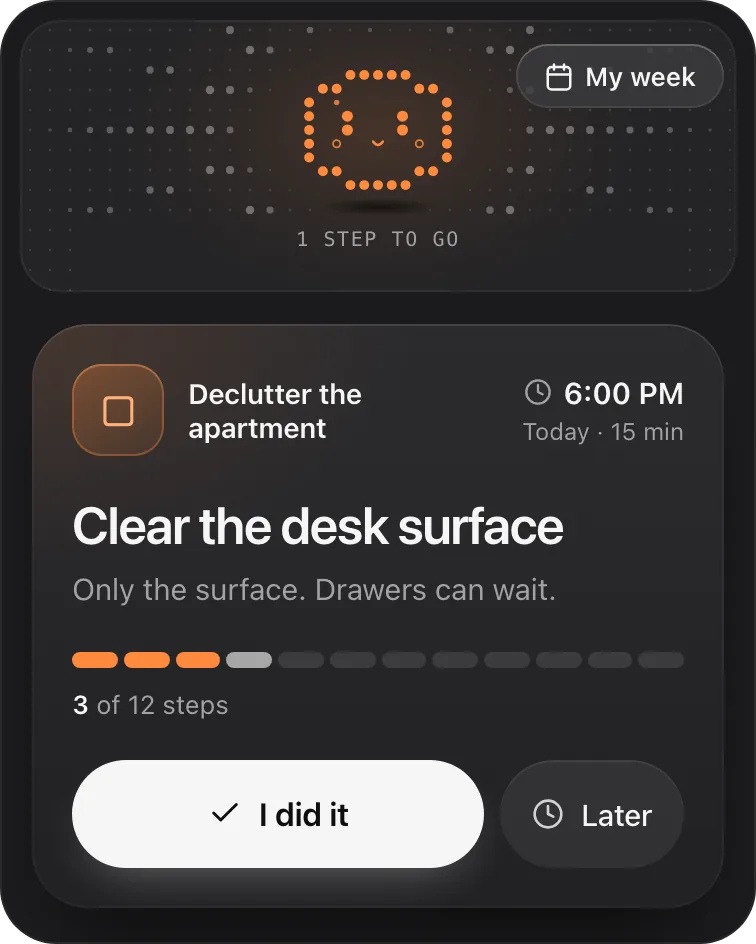
Petipa is in ChatGPT's plugin directory.
Enter a valid email.That didn't go through. Try again in a moment.
Add to ChatGPTQuestions
Why is time management so hard with ADHD?
Many adults with ADHD describe trouble feeling how long things take and how close a deadline is, so a plan built on guesses runs over. Putting time outside your head, with minutes on each step and a clock in view, tends to work better than trying to feel it.
What is time blindness?
It's an informal name many people use for losing track of time: an hour that feels like ten minutes, or a deadline that feels far off until it's close. The everyday answer is to make time visible, with a clock, a timer and minutes written on each step.
How can adults with ADHD manage time better?
Give every task a time in minutes, put fixed times in first, plan fewer things than feel possible, add buffers, and keep one step in view. Check your guesses against the real times for a week, and plan with the real numbers.
What are the best ADHD time management tools?
Simple ones: a clock you can see, a visual timer, labeled phone alarms, one calendar or paper planner for fixed times, and a log of guessed and real times. One or two you use daily beat a full system you stop opening.
How can I be on time with ADHD?
Work backward from the start time: travel time, plus time to get ready, plus a buffer. Set your alarm for when to start getting ready, labeled with what to do, not for the appointment itself.
Can ChatGPT help with ADHD time management?
Yes, for sizing the day. Give it your fixed times, your free time and your tasks, and ask for minutes on each step and a plan that fits. Treat its estimates as a first guess, and keep the plan somewhere outside the chat.