ChatGPT for ADHD: prompts that make planning easier
Eight copy-and-paste prompts for breaking tasks down, getting started, planning a realistic day and picking a plan back up.
The short answer
ChatGPT for ADHD planning helps most with the parts that are hardest to start: breaking a big task into small steps, choosing a first step, estimating time and fitting a day together. Ask for short answers and one step at a time, let it choose when you can't, and keep your plan somewhere outside the chat.
This article is about planning habits. It isn't medical advice, and ChatGPT isn't a replacement for support from a clinician or a coach.
Is ChatGPT helpful for ADHD?
For planning, it can be. ChatGPT is good at the parts of a plan that need a blank page filled: where to start, what comes next, how long it will take. It doesn't get bored of breaking things down, and you can ask it the same question five times.
It can also get in the way, in four common ways:
| What gets in the way | What to ask instead |
|---|---|
| Long answers: a wall of text you won't read | "Answer in 5 lines or fewer." |
| Too many options: ten ideas, no decision | "Pick one for me and say why in one line." |
| Easy agreement: ChatGPT can lean toward agreeing, so a plan too big for your week can still sound fine | "What am I not considering? Name one risk in this plan." |
| The plan stays in the chat, and the chat scrolls away | Keep the plan outside the chat (more on this below) |
The prompts below are built around those fixes.
8 ChatGPT prompts for ADHD-friendly planning
Copy them as they are, and change the brackets.
1. Break a big task down
Break "[task]" into steps that take 10 minutes or less.
Show me only the first 3 steps.
Asking for only the first three keeps the list from becoming the thing that stops you.
2. Find the first step
I'm stuck starting "[task]". What's the smallest physical first step?
One sentence, starting with a verb.
"Physical" matters: "open the document" is a step, "think about the report" isn't. And give yourself permission to stop after it: doing that one step counts, even if you go no further today. There's more on this in our guide to starting a task when you have too many.
3. Shrink an answer
That's too long. Rewrite it in 5 lines or fewer, most important first.
4. Plan a realistic day
Here's my day: [work 9 to 5, call at 2 pm, gym at 6].
My energy is best [in the morning].
Fit in these tasks with short breaks: [task 1], [task 2], [task 3].
Put the hardest one where my energy is best. Leave 30 minutes empty.
The empty half hour is on purpose. Days rarely go to plan, and a day with no slack falls apart at the first delay.
5. Get an honest time estimate
How long will each of these really take, including getting started
and finishing up? Add a buffer. [list]
6. Decide for me
I can't choose between these: [options].
Pick one for me and tell me why in one line. Don't list pros and cons.
7. Work alongside you
I'm starting "[task]" now, for 15 minutes.
When I come back and say "done", ask me what I did and suggest the next
small step.
Naming what you're about to do, even to a chat, can make it easier to begin. Set your own timer for the 15 minutes.
8. Pick up after a break
I stopped working on this plan [a week] ago. Don't recap everything
and don't restart it. What's one step I can do today?
An ADHD coach prompt for ChatGPT
If you want every planning chat to work this way, set it up once instead of explaining it each time. Paste this into your custom instructions, or at the start of a planning chat:
When I ask for help planning or getting things done:
- Keep answers short. 5 lines or fewer unless I ask for more.
- Give me one next step at a time, starting with a verb.
- Don't give me long lists or many options. If there are options, pick one.
- If I seem stuck, offer a smaller step.
- Before I commit to a plan, name one thing that could make it too much.
- If I skipped days, don't comment on it. Help me pick up from today.
To find custom instructions on the web or the desktop app, open Settings, then Personalization, check that Enable customization is on, and paste the text into the Custom Instructions field. In the iOS and Android apps, it's under Settings, then Customize ChatGPT, with Enable customization on. Custom instructions are available on every ChatGPT plan.
This makes ChatGPT behave like a calm planning coach. It isn't a clinician or a certified ADHD coach, and it won't replace one.
Using ChatGPT for ADHD at work
The same prompts work on work tasks, where starting is often the hardest part:
- An email you've been avoiding: "Draft a 3-sentence reply to this. Friendly, clear, no apologies." Then edit, instead of starting from nothing.
- A big project: prompt 1 on the project, then prompt 4 to fit the first steps into your week.
- A meeting: "Give me 3 bullet points I want to get across in this meeting: [context]."
- The end of the day: "Here's what I did and what's left. What's my first step tomorrow morning?" Write the answer down before you log off.
Keep ChatGPT from becoming the task
Some people who plan with ChatGPT describe the same trap: talking a plan through feels like progress, and an hour later nothing has moved. A few habits keep it a tool:
- Jot your own idea first, even one line, then ask. You stay the one deciding.
- Get the step, close the chat. The step is the point, not the conversation.
- Give each session an end: one plan, one first step, done.
If you'd rather not use AI at all, most of these methods work on paper too: a short list, a first step that starts with a verb, a half hour left empty.
For the day-to-day side, see time management for ADHD and ADHD motivation.
The hard part: keeping the plan between days
ChatGPT is good in the moment. The hard part often comes the next morning: the plan is three chats back, it's long, and you have to work out again where you are. In a very long chat, ChatGPT can also lose track of details from early on (why ChatGPT forgets). A note you paste back in each morning works, and it's one more thing to keep up.
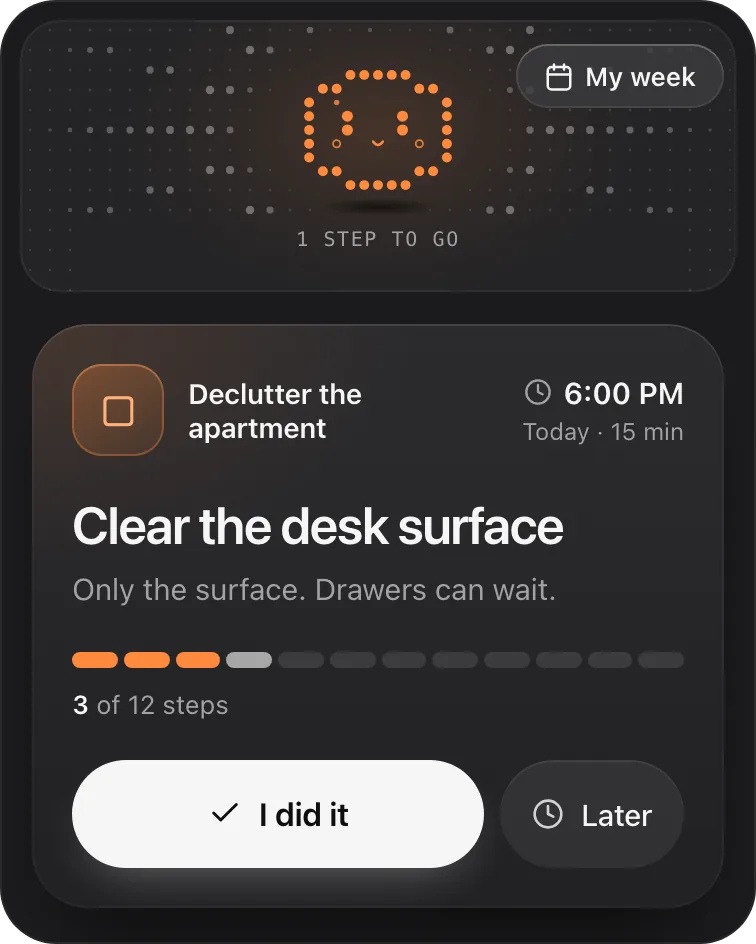
That's what Petipa is built for. Petipa is an app inside ChatGPT (a plugin) that keeps your plan and shows you one small step at a time, so you don't have to hold the plan in your head.
- One step in view. You see today's step, with its minutes, not the whole list.
- Two choices on each step. I did it, or Later.
- Your week, when you want it. My week shows what's done and what's next.
- No guilt after a break. Away for days? Nothing is lost. Start from today, or make the plan lighter.
To start, ask ChatGPT for a plan and say "save it to Petipa". Then each day, ask "@Petipa what's my step today?".
Petipa sends no reminders, so you still start the check-in yourself. A daily phone alarm that says "Ask @Petipa what's my step today?" covers that.
Petipa keeps your plan, its steps and which ones you've done. It doesn't store your conversations.
Petipa is in ChatGPT's plugin directory.
Enter a valid email.That didn't go through. Try again in a moment.
Add to ChatGPTQuestions
Is ChatGPT good for ADHD?
For planning, it can help: it breaks tasks down, suggests a first step and fits tasks into a day. Ask for short answers and one step at a time. It's a planning tool, and it doesn't replace support from a professional.
What are good ChatGPT prompts for ADHD?
Prompts that keep things small: "Break this into steps of 10 minutes or less, show only the first 3", "What's the smallest physical first step?" and "Pick one for me." There are eight in this article.
Can ChatGPT be an ADHD coach?
It can follow coach-style instructions for planning, like the ones in this article: short answers, one step at a time, no comments on skipped days. It isn't a clinician or a certified coach.
Where do I add custom instructions in ChatGPT?
On the web and the desktop app: Settings, then Personalization, with Enable customization on. In the iOS and Android apps: Settings, then Customize ChatGPT, with Enable customization on. They're available on every plan.
Can AI help adults with ADHD at work?
It can make starting easier: drafting the first version of an email, breaking a project into steps, and choosing tomorrow's first step before you log off.
Does Petipa store my chats?
No. Petipa keeps your plan, its steps and which ones you've done, never your conversations.