ADHD planner for adults: what to look for, and how to keep using it
What to look for in a planner when you have ADHD, which format suits you, a daily page you can copy, and how to keep using it after the days you don't open it.
The short answer
The best ADHD planner for adults is the one you'll still open after a gap. Look for undated pages, room for a short list of today's few things, space to write minutes next to each one, one page for everything else, and little upkeep. Paper, an app or ChatGPT can all work. A restart rule matters more than the format.
What is an ADHD planner?
An ADHD planner is a planner laid out for the way many adults with ADHD describe planning: fewer things per day, everything in one place, and no penalty for skipped days. It isn't a medical tool, and you don't need one sold under that name. Any notebook, printable page or app can become an ADHD-friendly planner if it keeps those three things.
Why it matters: in ADHD groups online, people often describe the same arc. A new planner is exciting for a week. Then a busy day goes by without opening it, then a few more. Dated pages show a row of blank days, a habit tracker shows a broken chain, and last week's list is waiting to be copied over. Opening the planner starts to feel like reading a report card, so it stays closed.
So the useful question isn't "which planner?" It's "what happens on the day I come back?" A planner that makes coming back easy will outlast a beautiful one that makes it heavy.
What to look for in a planner for ADHD
Most "best planner for ADHD" lists rank features. These are the ones that help a planner survive the weeks after you buy it:
| Look for | Why it helps |
|---|---|
| Undated pages | A week away leaves no blank pages. You write today's date and carry on |
| A short daily list, three to five lines | A day that fits on a few lines is a day you can finish |
| Room for minutes next to each item | A task with a time is a known size, and easier to start |
| One page for everything else | Ideas and errands have a home without crowding today |
| A week on one page | You see the fixed times and the lighter days at a glance |
| Little upkeep | Nothing you have to fill in every day to keep it "working" |
| Easy to keep in view | A planner open on the desk gets used; one in a bag gets forgotten |
And what to skip, or leave blank without guilt:
- Hour-by-hour grids for every day. They look organized and turn into a record of what didn't happen.
- Habit trackers and streak boxes. One skipped day breaks the chain, and the page remembers it.
- Many sections to maintain. Each one is a small job. If keeping the planner tidy becomes a task of its own, drop a section, not the planner.
Paper, app or ChatGPT: which ADHD planner suits you?
Whichever you'll open tomorrow. Each kind has a strength and a catch:
| Kind | Good at | Watch out for |
|---|---|---|
| A paper planner or notebook | Staying in view, with nothing pinging you away | It can't move a task for you, and it stays home when you leave |
| A printable page | Costs nothing, and you can redesign it any time | Loose sheets get lost; keep them on a clipboard or in one folder |
| A calendar or planner app | Fixed times and alerts, always with you | Every new app is one more place to check |
| ChatGPT | Turning a messy list into a short plan with minutes, and re-planning when the day changes | A chat isn't a record; the plan scrolls away unless you keep it somewhere |
Many people use two: one place for fixed appointments, like a calendar, and one short list for today. More than two tends to mean nobody knows where anything is, including you.
An ADHD daily planner page you can copy
Copy this into a notebook, a notes app or a document, and print it if you like. One page a day, no date printed:
Date: ________

Fixed today (can't move):
  ________________________

Today's three (first action + minutes):
  1. ______________________  ___ min
  2. ______________________  ___ min
  3. ______________________  ___ min

If there's time:
  ________________________

Not today (goes to the back page):
  ________________________

Next step for tomorrow, in one line:
  ________________________
Write each item as a first action, with a verb and a rough time:
| Instead of | Write |
|---|---|
| Taxes | Find last year's tax return, 10 min |
| Clean kitchen | Clear the counter, 15 min |
| Call about the car | Look up the garage's number, 2 min |
The last line, the next step for tomorrow, is what makes the next morning easy: you open the planner and the first thing is already decided.
How to use an ADHD planner, and keep using it
Look at it for two minutes, at the same moment each day. Tie it to something you already do: coffee, sitting down at your desk, brushing your teeth at night. Cross off what's done and write tomorrow's three. A short look you actually do beats a long weekly review you keep putting off.
Keep one back page for everything that isn't today. Ideas, errands, someday things. You don't need to sort it. When you plan tomorrow, you pick from it.
Look at the week once. Ten minutes on a Sunday or a Monday morning: fixed times, up to three priorities, one lighter day. The ChatGPT weekly planner has a prompt for it.
Use a restart rule, not a catch-up. Decide now what you'll do when you come back after days away, so you don't have to decide later:
- Turn to a fresh page. Don't look back at the old ones yet.
- Write today's date and one thing for today, the smallest useful one.
- Do it, cross it off, and stop there if you like.
- Tomorrow, glance at the back page and pick up to three things again.
Unfinished items from before the gap don't all come back. If something still matters, it will find its way onto a new page. The rest can go.
If what goes on the page keeps running over, the trouble is often the minutes, not the planner. Time management for ADHD covers estimating steps and sizing the day.
Use ChatGPT to fill the page
If turning a big task into a first action is the hard part, ChatGPT can do that step for you. Paste your list:
Here's everything on my mind: [your list].
Pick up to three things for today. For each one, give me the first
physical action, starting with a verb, with a rough time in minutes.
Keep the rest as a short "later" list. Keep your answer short.
When you're back after a gap:
I'm restarting my planner after some days away. Here's what was on
my list: [list]. Don't make a catch-up plan. Give me one small thing
to do today, and a short list of what still seems to matter.
On a low-energy day:
My energy is low today. What's the smallest version of [task] that
still counts? One line.
Then copy the answer onto the page and close the chat. The planner is where you look each day; ChatGPT just helps you write it. ChatGPT can sound sure and still be wrong about how long things take, so treat its times as a first guess.
If you plan in ChatGPT often, a Project can keep those chats and your instructions together, depending on your ChatGPT plan. Create one called "Planner" and add instructions such as "Keep answers short. Never more than three things for today. Don't comment on days I didn't plan."
And if you'd rather not use ChatGPT at all, everything above works with paper and a pen.
Before filling a planner, a brain dump gets everything out of your head in ten minutes.
How Petipa helps when the planner holds a plan
Some of what goes in a planner is a longer plan: a move, a course, getting fit, decluttering the apartment. Those are where gaps hurt most, because finding your place again means rereading the whole plan.
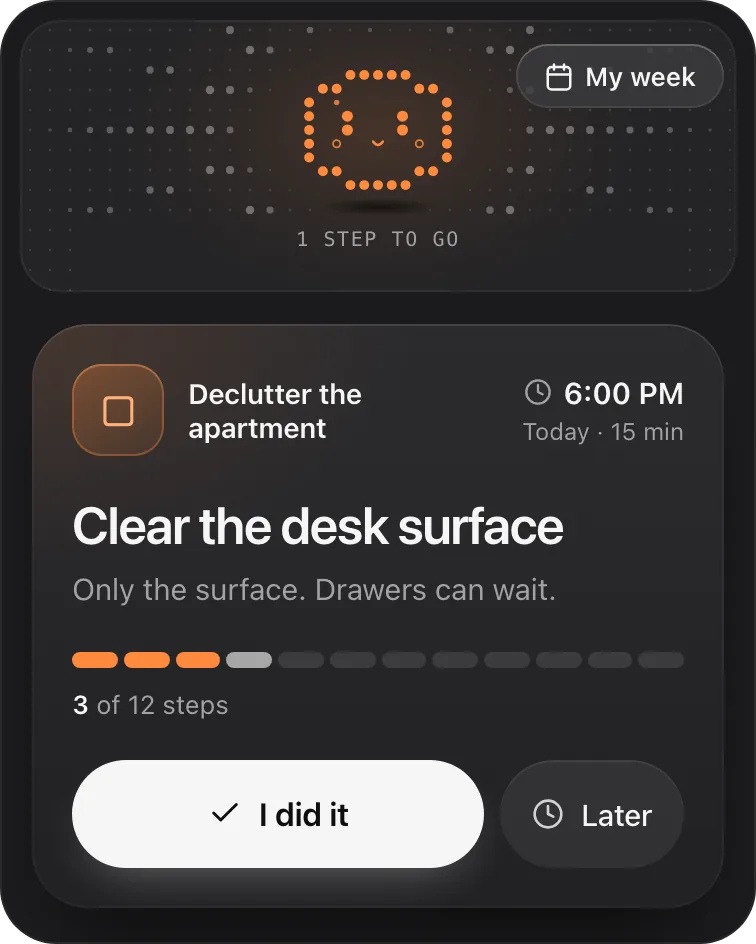
Petipa is an app inside ChatGPT that keeps a plan like that and shows you one small step at a time. ChatGPT helps you make the plan; Petipa remembers it after the chat is closed, and never stores your conversations. Here's how it works:
- Make the plan with ChatGPT, check it, then say "save it to Petipa".
- Each day, ask "@Petipa what's my step today?" You see one step with its minutes.
- Tap I did it when it's done, or Later if now isn't the moment. My week shows what's done and what's coming up this week.
Away for a few days? Nothing is lost, and there's no streak to break. Petipa welcomes you back calmly, and you start from today. If the plan needs to change, ChatGPT proposes it and Petipa saves it only after your yes.
What it doesn't do: Petipa isn't a full planner. It doesn't hold your appointments or your daily errands, it has no calendar sync, and it sends no reminders, so you still start the check-in yourself. Your paper planner can do that job: write "ask @Petipa what's my step today?" as a standing line on each page.
Petipa is in ChatGPT's plugin directory.
Enter a valid email.That didn't go through. Try again in a moment.
Add to ChatGPTQuestions
What is the best planner for adults with ADHD?
The one you'll still open after a few days off. Look for undated pages, a short daily list with room for minutes, one page for everything else, and as little upkeep as possible. The format matters less than a planner you can come back to.
Is a paper or digital planner better for ADHD?
Whichever you'll open tomorrow. Many people find paper easier to keep in view, while a phone is always with them. Try one for two weeks, with a restart rule, before switching.
Is there a free ADHD planner?
A plain notebook works, and so does the daily page above: copy it into a notes app or a document and print it. You can also ask ChatGPT to lay out a one-page planner as a table you copy.
What should I write in an ADHD daily planner?
Today's fixed times, up to three things written as first actions with minutes, and one line naming tomorrow's first step. Everything else goes on a separate page.
How do I use a planner effectively with ADHD?
Keep it small: a two-minute look at the same moment each day, at most three things for today, one back page for everything else, and a ten-minute look at the week.
What do I do when I stop using my planner?
Nothing needs fixing. Turn to a fresh page, write today's date and one small thing, and do it. Old unfinished items only come back if they still matter.