How to finish projects with ADHD, through the middle and the last stretch
Starting is the fun part. A plain way through the middle and the last stretch: a written finish line, short steps, a parking list for new ideas, a note for next time, and a restart after weeks away.
The short answer
To finish projects with ADHD, write down what "done" looks like before you go further, cut the middle into steps of 25 minutes or less, park new ideas on a list instead of starting them, end every session with a one-line note naming the next step, and restart from that note after a gap, without counting the days away.
Why projects stall in the middle
Most advice for ADHD is about starting, and starting is often the easy part of a project. The idea is new, the first steps are clear, and it feels good. Then the middle arrives: the work gets repetitive, the steps get vague, and a newer idea starts to look more exciting.
Many people with ADHD describe a shelf of projects that got to this point and stopped. People who plan with ChatGPT describe the same shape: it helps them get going, and the project still stalls at a later wall. Talking a plan through can feel like progress while the project itself doesn't move.
The pages that rank for this question give good advice: make progress visible, break the project down, run one project at a time. What they rarely give is a way to get back in after you stop, which is where many projects actually end. Each return can feel like starting from zero. So the method below is built around the stop and the return as much as the work.
How to finish projects with ADHD in six steps
1. Write the finish line
Before you go further, write one or two sentences that say what "done" means. Make it something you could check:
| Vague | A finish line you can check |
|---|---|
| Fix up the website | Five pages live, contact form works, old pages removed |
| Write the novel | A full first draft, start to end, in one file |
| Organize the garage | Car fits inside, shelves labeled, donate pile gone |
| Learn to knit | One finished scarf |
A written finish line does two jobs. It tells you when to stop polishing, and it gives you something to cut when the project grows: if a new part isn't needed to reach the finish line, it can wait for version two.
2. Cut the middle into short steps
The middle stalls because its steps are fuzzy: "work on chapter three", "do the backend". Rewrite each one as an action with a verb and a size of 25 minutes or less: "Write the scene where they meet, 25 min", "List the fields the form needs, 10 min".
Keep the full list somewhere you don't read every day. Seeing every step left can make a project feel like a mountain, so look at one step at a time. If a step still won't start, how to start a task covers that first minute.
3. Park new ideas, don't start them
New ideas will keep arriving, and some will be good. Keep a parking list next to the project: one line per idea, no details, no plan. Writing it down lets you let it go without losing it.
When the current project reaches its finish line, read the parking list and pick the next one. Many people find the urge to start something new fades once the idea is safely written down.
4. End every session with a note
This is the habit that does the most for finishing. Before you stop, even if you stop abruptly, write one line:
Next: [the very next action, with a verb]. Stuck on: [anything unclear].
For example: "Next: write the closing paragraph of section two. Stuck on: which example to use." Put the note where you'll see it when you come back: the top of the file, a sticky note on the laptop, the first line of the project folder.
Next time, you don't have to rebuild the whole project in your head. You read one line and do it.
5. Plan for the last stretch
The end of a project often goes slower than the middle. The last pieces are small, scattered and dull: fix the links, write the summary, send it. Give the last stretch its own short list as soon as you can see it, and treat each item like any other step, with a verb and minutes.
If you notice you're polishing instead of finishing, check the finish line from step 1. Anything not on it goes to the parking list.
6. Restart after a gap
Weeks away from a project are normal, and they don't mean the project is over. When you come back:
- Don't count the days or weeks you were away.
- Read your last note and do that one step, or its smallest version.
- If the project no longer fits your life, make the finish line smaller rather than pushing harder.
A smaller project you finish beats a bigger one that waits on the shelf. For coming back to a plan made in ChatGPT, how to resume a ChatGPT plan walks through it.
Long-term and creative projects
Projects that run for months work best as a series of short ones. Set the long project as the direction, then pick a piece you can finish in four to eight weeks, with its own finish line: "a first draft of act one", "the kitchen cabinets done". How to set goals with ADHD covers that short horizon in more detail.
Creative projects have one more trap: the work is never quite good enough to call done. Decide in advance what "good enough for now" means, write it into the finish line, and keep a separate list of improvements for a later pass.
A thesis or dissertation
A thesis is a long project with a fixed finish line set by someone else, so the same method applies. Break it into chapters, each chapter into sections, and each section into steps of 25 minutes or less. End each writing session with a note naming the next sentence or source to look at.
ChatGPT can help you plan a thesis: turn the outline into a schedule, explain a concept you're stuck on, or suggest what to read next. The writing and the ideas have to be yours. Check your school's rules on AI use before you start, and treat anything ChatGPT says about a source as something to verify.
Use ChatGPT to plan the rest of the project
If you've stalled in the middle, ChatGPT can help you turn what's left into steps. Keep the prompt short and ask it to ask you first:
I'm partway through a project: [what it is].
Here's what's done: [list]. Here's what's left: [rough list].
Ask me up to 3 questions first: what "done" means to me,
how much time I really have each week, and where I got stuck.
Then write a one-line finish line, and list the remaining steps,
each starting with a verb, each 25 minutes or less.
Show me the next three steps only. Keep it short.
ChatGPT tends to agree with the plans it's shown, so ask it to cut before you commit:
Here's my finish line and remaining steps: [paste them].
What could I cut and still call this project done?
Which steps are vague enough that I'll stall on them?
Treat its time estimates as guesses. A project in ChatGPT keeps related chats and files in one place, so the plan is easier to find when you come back. Then close the chat and do the first step: the step is where the project moves.
Everything here works on paper too: a notebook page with the finish line, the steps, the parking list and your last note.
How Petipa helps you finish
A plan for the rest of a project, made in a chat, has one weak spot: it scrolls away. After a few weeks off, finding your place means rereading the whole conversation, which is exactly the cold start that ends many projects.
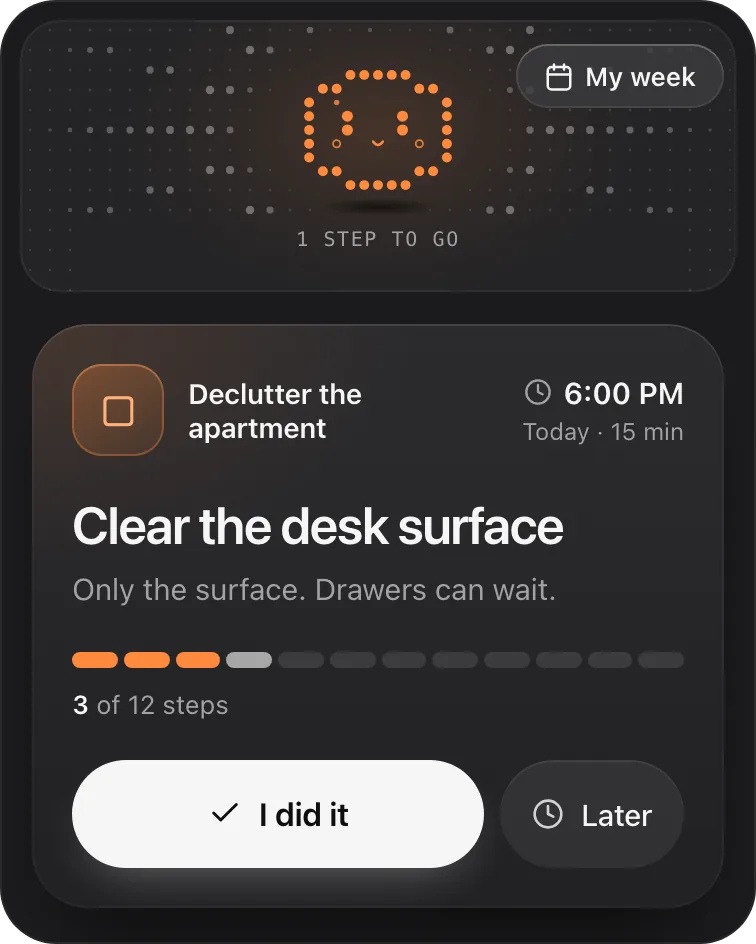
Petipa is an app inside ChatGPT that keeps a plan like this and shows you one small step at a time. ChatGPT helps you plan the project; Petipa remembers the plan after the chat is closed, and never stores your conversations. Here's how it works:
- Plan the remaining steps with ChatGPT, adjust them until they fit your week, then say "save it to Petipa".
- When you sit down to work, ask "@Petipa what's my step today?". You see one step with its minutes, and the rest of the project stays out of view.
- Tap I did it when it's done, or Later if today isn't the day. My week shows what's done and what's next this week.
Away for a few weeks? Nothing is lost. Petipa welcomes you back calmly and you pick up from the next step, not from the beginning. If the plan needs to change, Petipa asks before it changes it.
What it doesn't do: Petipa sends no reminders, so the cue to sit down is yours. A phone alarm that says "ask @Petipa what's my step today?" covers that, and depending on your ChatGPT plan, a scheduled task can send you a message too. Petipa also doesn't decide whether a project is worth finishing: that stays with you.
Petipa is in ChatGPT's plugin directory.
Enter a valid email.That didn't go through. Try again in a moment.
Add to ChatGPTQuestions
Why do I start projects and not finish them with ADHD?
Many people with ADHD describe starting as the exciting part, while the middle gets repetitive and vague and a newer idea pulls attention away. A written finish line, short steps, a parking list for new ideas and a note at the end of each session make the middle easier to get through.
How do I finish long-term projects with ADHD?
Keep the long project as a direction, and plan a piece you can finish in four to eight weeks, with its own finish line. End each session with a one-line note naming the next step, so returning after a gap takes one line, not a full reread.
How do I finish creative projects with ADHD?
Decide in advance what "good enough for now" means and write it into the finish line. Keep a separate list of improvements for a later pass, so polishing doesn't stop the project from being done.
What should I do when I come back to a project after weeks away?
Don't count the time away. Read your last note, do that one step or its smallest version, and if the project no longer fits, make the finish line smaller.
Can ChatGPT help me finish a project?
It can help you write a finish line, turn what's left into short steps and point out steps you'll likely stall on. It tends to agree with your plans, so ask it what to cut, and treat its time estimates as guesses.