ADHD overwhelm: what to do when everything feels like too much
What many people mean by ADHD overwhelm, a five-minute reset for when it hits, what to drop this week, and how to keep the pile out of view.
The short answer
ADHD overwhelm is what many people call the moment when too much is in view at once: tasks, messages, clutter, decisions. The way out is to see less. Step away for a minute, get everything onto one page, circle what has to happen today, move or drop the rest, and do one small step.
What is ADHD overwhelm?
ADHD overwhelm isn't a diagnosis. It's a word many people with ADHD use for the point where there's more in front of them than they can sort: a long to-do list, a full inbox, a messy room, a day with too many moving parts. Everything feels urgent, nothing feels possible, and choosing where to begin becomes a job of its own.
People describe it in similar ways:
- The whole list sits in your head at once, and every item feels loud.
- You can't decide what comes first, so you do nothing, or a small thing that doesn't matter.
- You scroll, tidy or switch tabs to get away from it.
- You get short with people, or want to hide.
- You shut down: you stare at the screen and can't take anything in.
Many people call the freeze at the end of it ADHD paralysis. Overwhelm is the too-much; paralysis is the stuck that can follow. If starting one task is your hard part, our guide to ADHD paralysis covers that first minute.
What sets off ADHD overwhelm
| What piles up | What it looks like | First move |
|---|---|---|
| Too many tasks | A long list, several deadlines in one week | Get it onto one page, then circle one thing |
| Too many decisions | Small choices all day: what first, what to answer, what to say yes to | Decide once with a rule, or ask someone to pick |
| Too much around you | Clutter, noise, open tabs, a phone that keeps lighting up | Make one surface or one screen calm |
| A feeling under the task | Dread of a hard email, worry about doing it wrong | Name it, then make the first step tiny |
The common thread is that too much is visible at once. Many people who plan with ChatGPT notice the same thing from the other side: a long reply, or a breakdown into twenty tiny steps, can turn into one more pile to look at. So the aim isn't to see the whole picture more clearly. It's to see less of it.
Shrink what you can see
Three changes do most of the work:
- One list. Every task in one place, not spread across your head, three apps and a dozen sticky notes. One list means nothing gets lost, so you can stop holding it all.
- One step. From that list, only the next step is in view, with how long it takes.
- The rest out of sight. Close the list once you've picked. The other tasks aren't gone. They're waiting where you can find them.
The reset below puts this into practice in five minutes.
A five-minute reset for ADHD overwhelm
Use this when it hits. You need a pen and one sheet of paper, or a blank note.
- Minute 1: step away. Stand up, get some water, look out a window. Many people find that a few slow breaths, breathing out longer than they breathe in, help them settle before deciding anything.
- Minutes 2 and 3: empty your head. Write everything on the page: tasks, messages to answer, worries, errands. No order, no judging.
- Minute 4: circle what has to happen today. Often that's one to three things. For each item, ask: what happens if this waits until tomorrow? If the answer is "nothing much", it waits.
- Minute 5: shrink one to a first step. Take one circled item and write its very first physical action, small enough for two minutes: "open the email", "find the form", "clear one shelf".
Then turn the page over, close the other tabs, and do that one step. Stopping after it still counts. If there's room, take the next circled item the same way.
What to drop this week
Overwhelm often means the week asks for more than it holds. The reset clears today; this clears the week. Take your page and sort every item into four groups:
| Group | What goes in it |
|---|---|
| Today | The one to three things you circled |
| This week | What really has to happen before the week ends |
| Later | Things that matter, but not this week. Write them down and stop looking at them |
| Let go | Things you can drop without real cost |
These questions help with the sorting:
- Is anyone waiting on this? If not, it can probably move to later.
- Would a smaller version do? A two-line reply instead of a long one, a simple dinner instead of a recipe. Good enough counts.
- Can someone else do it, or help? Ask once, plainly.
- Can it move? Cancel or move one commitment this week. One open evening can change how the whole week feels.
- Does it need a yes right now? "Not this week. Can I get back to you next week?" is a full answer to a new request.
If clutter is the pile, how to declutter with ADHD works one small area at a time. For planning the week itself, the ChatGPT weekly planner has a Sunday prompt and a midweek check.
When ADHD overwhelm hits at work
- Write it all down first, before you answer anything.
- Ask which comes first. "I have A, B and C this week. Which matters most to you?" is a normal question at work, and it puts the choice with the person who knows.
- Answer messages at set times instead of all day, if your job allows it.
- Keep one window open: the file for the step you're on.
- Leave a note before you stop. One line naming the next step, so tomorrow starts there and not from the whole pile.
Use ChatGPT to sort the pile
Paste your page into ChatGPT and let it do the sorting. Ask for a short answer, so the reply doesn't become one more thing to read:
I'm overwhelmed. Here's everything on my mind: [paste your list].
Sort it into four groups: Today (at most 3), This week, Later, Let go.
For Today, give me only the first item's first physical step,
small enough to do in two minutes. Keep the whole reply under 100 words.
When you're not sure what to drop:
Look at my "This week" list. Which items could move to later, get
smaller, or be dropped without real cost? One line each, with why.
When your energy is low:
I'm overwhelmed and low on energy. Give me one thing to do in the
next 10 minutes, and its smallest version. Nothing else.
ChatGPT tends to go along with what you give it, and it will happily fit every task into your week if you let it. Ask it what to drop, not only how to fit everything in. Then close the chat and do the step. If you'd rather not use ChatGPT, the same sorting works on paper.
Keep the pile from building again
- One place for new tasks. When something new comes up, put it on the list right away, not in your head.
- A ten-minute weekly reset. Once a week, sort the list again into this week, later and let go. That keeps "later" from turning into a second pile.
- Only today's step in view. Keep the full list where you don't have to look at it every day.
- Come back without catching up. After a few overwhelmed days, don't try to do everything that waited. Many people describe a backlog as the thing that makes coming back hardest. Start from today: one step, and re-sort the rest at your next reset.
How Petipa keeps the pile out of view
The reset and the weekly sort work with paper alone. They get harder with a plan that runs for weeks, like a move, a course or a project at home, where seeing the whole plan each morning can bring the overwhelm right back.
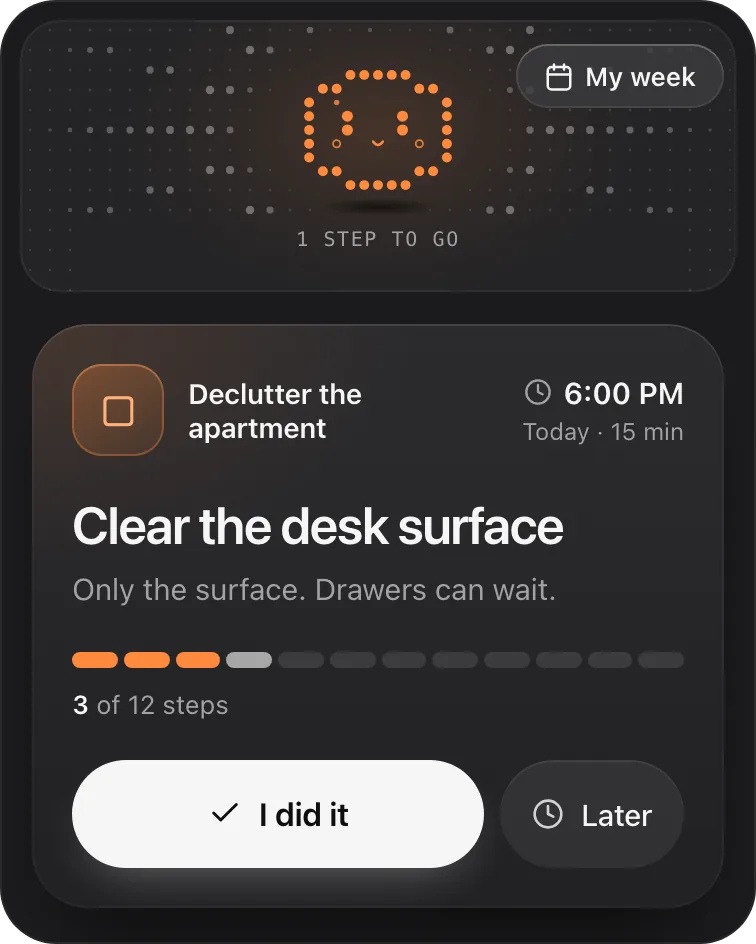
Petipa is an app inside ChatGPT that keeps that kind of plan out of view. ChatGPT makes the plan with you; Petipa keeps it after the chat is closed and shows you one step at a time, with its minutes. It never stores your conversations. Here's how it works:
- Make the plan in ChatGPT, trim it until it fits your week, then say "save it to Petipa".
- Each day, ask "@Petipa what's my step today?" You see one step and its minutes, and the rest stays out of view.
- Tap I did it when it's done, or Later if now isn't the moment. My week shows what's done and what's coming, when you want the bigger picture.
Away for a few days? Petipa welcomes you back, nothing is lost, and you start again from today. If the plan needs to change, ChatGPT proposes it and Petipa saves it only after your yes.
What it doesn't do: Petipa isn't a list for every task in your day, and it sends no reminders. If remembering to ask is the hard part, set your own daily alarm that says "ask @Petipa what's my step today?".
Petipa is in ChatGPT's plugin directory.
Enter a valid email.That didn't go through. Try again in a moment.
Add to ChatGPTQuestions
What does ADHD overwhelm feel like?
Many people describe the whole to-do list sitting in their head at once, not being able to choose what's first, escaping into small tasks or scrolling, and sometimes shutting down. It's an everyday word, not a diagnosis.
What should I do when I'm overwhelmed with ADHD?
Step away for a minute, write everything on one page, circle what has to happen today, and shrink one item to a two-minute first step. Then hide the rest and do that step.
How do I stop feeling overwhelmed by too many tasks?
See fewer of them. Keep every task on one list, pick today's one to three, move the rest to later or let them go, and keep only the next step in view.
How do I calm down when ADHD overwhelm hits?
Many people start by stepping away from the screen, drinking some water and taking a few slow breaths. Then they write one thing down, so the next move is small and clear.
Is ADHD overwhelm the same as ADHD paralysis?
People often use the two together. Overwhelm is the feeling of too much at once; ADHD paralysis is the freeze that can follow, when you can't start anything at all.
How can I help someone with ADHD who's overwhelmed?
Offer to sit with them while they write everything down, then ask what has to happen today. Help with one thing, not the whole list, and skip advice they didn't ask for.
When should I talk to someone about ADHD overwhelm?
If it gets in the way of work, home or how you feel about yourself most weeks, talk to a doctor or a therapist you trust. This page is everyday planning help, not care.