ADHD organization: a simple system for your tasks and your time
A small system you can keep up on a hard week: one place to catch every thought, one short list for today, a home for each kind of note, and a ten-minute reset.
The short answer
ADHD organization works best as a small system you can keep up on a hard week: one place to catch every thought, one short list of up to three things for today, a home for each kind of note, and a ten-minute reset once a week. Start with tasks and time. For things and rooms, start with one small area you can finish.
What ADHD organization covers here
Getting organized can mean two different jobs. One is organizing things: papers, rooms, the closet. The other is organizing tasks and time: what to do, when, and where it's written down. This page is about the second. For things, see how to declutter with ADHD, which works one small area at a time.
Tasks and time come first for a practical reason. A tidy desk doesn't tell you what to do next. A short list does.
Why getting organized is hard with ADHD
Many adults with ADHD describe the same picture: thoughts in five places at once. A to-do on a sticky note, an appointment in a text message, an idea in a notes app, a bill in a pile on the counter, and the rest held in their head. Each place works on its own. Together they mean nothing is quite findable, and the head keeps trying to hold it all.
The other pattern people describe is the system that gets dropped. A new app or a color-coded binder works for a week or two, then needs upkeep: sorting, tagging, copying things over. When the upkeep costs more than it gives back, the system stops, and the scattered notes come back.
So the system below is small on purpose. It has five parts, and the only regular upkeep is ten minutes a week.
How to get organized with ADHD: a simple system
1. One capture place
Pick one place where every new thought goes first: a pocket notebook, one note on your phone, or voice notes if typing is the hard part. Tasks, ideas, things to buy, questions for someone, all in the same place.
Two rules make it work:
- Only one. A second capture place means checking two.
- Don't sort while you capture. Write it in a few words and go back to what you were doing. Sorting happens at the weekly reset.
2. One short list for today
Each morning, or the night before, pick up to three things from the capture place for today. Write each as a first action with its minutes: "Find the insurance letter, 5 min", not "insurance". Keep the list where you'll see it, and keep everything else out of view.
This list is the part that tells you what to do. The capture place only holds things; it doesn't choose. If you keep this list in a planner, what to look for in an ADHD planner helps you pick one that lasts.
3. A home for each kind of note
A to-do list gets crowded when things that aren't tasks sit with the tasks. Give each kind of note its own home, and keep the number of homes small:
| Kind of note | Its home |
|---|---|
| Appointments and fixed times | One calendar, paper or app |
| Things to do | The capture place, then today's list |
| Papers to deal with | One folder or tray, where the mail lands |
| Ideas and someday things | One "later" page or note |
| Facts you'll look up again, like a confirmation number | One reference note |
| A plan that runs over weeks | One place per plan |
When you don't know where something goes, it goes to the capture place. That's the default for everything.
4. A ten-minute reset, once a week
Same day, same time each week, set a timer for ten minutes:
- Empty the capture place: each item goes to its home, onto the next few days' lists, or gets crossed out.
- Look at next week's fixed times.
- Pick up to three priorities for the week.
- Open the papers folder and deal with anything that has a date on it.
- Cross out what no longer matters.
When the timer ends, stop, even if something's left. A short reset you do every week beats a full one you keep putting off.
5. A restart rule for after a gap
Some weeks the system won't get touched. When you come back to an overflowing capture place, don't sort the whole backlog. Pick one thing for today from the newest notes, do it, and leave the rest for the next weekly reset. Anything that still matters will come up again.
ADHD organization tools and tips
You don't need special products. These help with tasks and time:
- A pocket notebook or one phone note as the capture place, whichever is always with you.
- Voice notes for capturing when writing feels too slow.
- One calendar for fixed times, with an alert before anything you have to leave for.
- A tray or folder where the mail lands, so papers have one place.
- A visual timer for the weekly reset and for single steps.
- A "where I stopped" note. Before you put a task down, write one line naming the next small step, and leave it where you'll see it. Coming back is easier when the first move is already written.
- One in, one out for commitments. When you take on something new, drop something old.
For the hours themselves, time management for ADHD covers estimating steps and sizing the day.
How to stay organized with ADHD at work
The same system works at work, with two adjustments:
- One capture place for work and home, or two at most, never one per project. A separate place for each project or tool turns finding anything into a search.
- A two-minute close at the end of each workday. Write tomorrow's first step, move stray notes into the capture place, and glance at tomorrow's meetings. The next morning starts from a decided step instead of the inbox.
Use ChatGPT to sort a brain dump
ChatGPT is good at the sorting step: turning a messy dump into the homes above. Paste everything from your capture place:
Here's everything from my notes this week, in no order: [paste].

Sort it into:
1. Appointments (with dates)
2. Things to do, each as a first action with a time in minutes
3. Papers to deal with
4. Ideas and someday things
5. Can drop

Then pick up to three things for this week and say why, in one
line each. Keep it short.
For the weekly reset:
Weekly reset. Here's my capture list: [paste].
Next week's fixed times: [list].
Pick up to 3 priorities for the week, give each a first step with
minutes, and list what can wait. Don't comment on what didn't
get done last week.
Then copy the result into your own notes and close the chat. Many people who plan with ChatGPT find a chat is a forgiving place to dump thoughts but a weak place to keep them. With Memory on, ChatGPT can remember relevant details from your chats, but not every detail of every conversation, and what's available depends on your plan and settings. Keep the list where you can open it without scrolling, and keep sensitive details like account numbers out of the chat.
How Petipa fits into an organizing system
Petipa isn't a capture place or a general to-do list. It fits one home in the table above: a plan that runs over weeks, like a move, a course or clearing the garage.
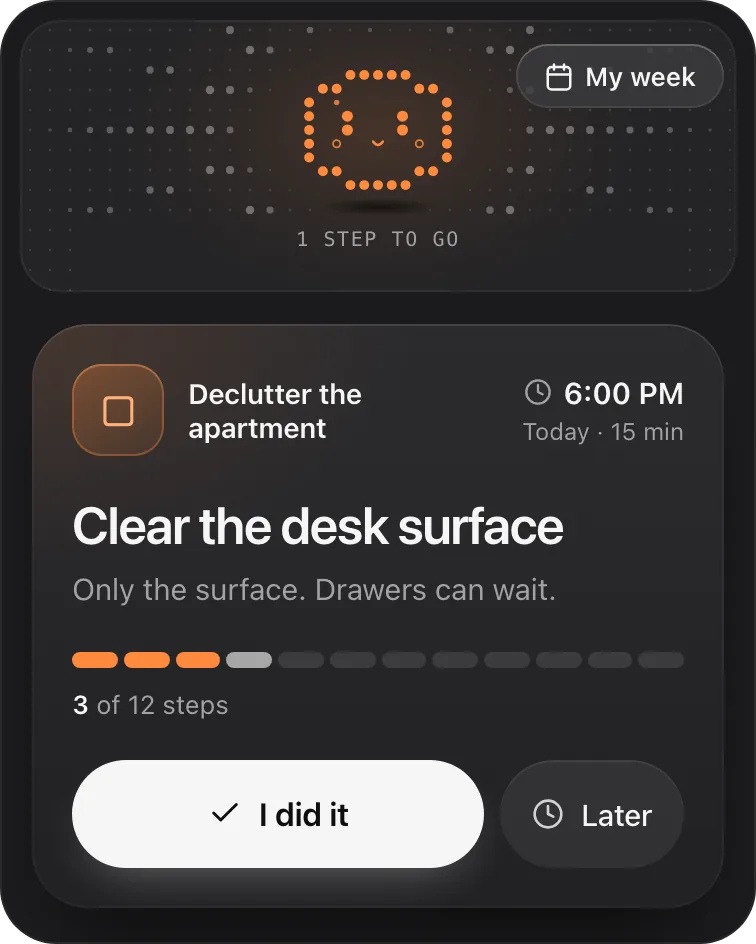
Petipa is an app inside ChatGPT. ChatGPT makes the plan with you; Petipa keeps it after the chat is closed and shows you one step at a time. It never stores your conversations. Here's how it works:
- Make the plan in ChatGPT, check it, then say "save it to Petipa".
- Each day, ask "@Petipa what's my step today?" You see one step with its minutes, instead of the whole plan.
- Tap I did it when it's done, or Later if now isn't the moment. My week shows what's done and what's coming up this week.
Away for a while? Nothing is lost: Petipa welcomes you back and you start from today. If the plan needs to change, ChatGPT proposes it and Petipa saves it only after your yes.
What it doesn't do: Petipa sends no reminders and has no calendar sync, so appointments stay in your own calendar, and you still open the check-in yourself. Put "ask @Petipa what's my step today?" on today's list, or on a daily phone alarm.
Petipa is in ChatGPT's plugin directory.
Enter a valid email.That didn't go through. Try again in a moment.
Add to ChatGPTQuestions
How do I get organized with ADHD?
Start with a small system: one capture place for every thought, one short list of up to three things for today, a home for each kind of note, and a ten-minute reset once a week. Organize tasks and time first, then things, one small area at a time.
How do I stay organized with ADHD?
Keep the upkeep small. One capture place, a short daily list and a ten-minute weekly reset are easier to keep up than a detailed system, and a restart rule gets you back in after a gap without sorting the backlog.
What is a good ADHD organization system?
One with few parts and little upkeep: a single capture place, a short list for today, one home per kind of note, and a weekly reset. If running the system takes more time than it saves, cut a part.
How do I stay organized at work with ADHD?
Use one capture place for everything, not one per project, and end each workday by writing tomorrow's first step. The next morning starts from a decided step instead of the inbox.
Can ChatGPT help me get organized?
Yes, with the sorting. Paste a messy brain dump and ask it to sort the items into appointments, tasks with minutes, papers, ideas and things to drop. Copy the result into your own notes, since a chat isn't a reliable place to keep the list.
Are there ADHD organizations that offer support?
Yes. Many countries have national ADHD nonprofits and support groups, for adults and for families. Searching for an ADHD association with your country's name is a good start. This page is about getting organized day to day.