Custom GPT not available: "This plugin isn't available to you", explained
What the message likely means, what still works, and what to do before December 11.
The short answer
The message most likely means the GPT you use now has a replacement plugin that hasn't been made available to you. OpenAI says access to a GPT doesn't carry over to its plugin, and a migrated plugin starts private. The GPT itself keeps working until December 11, 2026, and your past chats stay. Ask its creator where the replacement is, and save what you need now.
OpenAI's help center doesn't explain this message word for word. What follows comes from its custom GPT retirement FAQ and its plugins guide, as of October 31, 2026.
What "This plugin isn't available to you" means
OpenAI is retiring custom GPTs and moving them to plugins. When a GPT's creator migrates it, the GPT gets a replacement plugin. The message most likely says that plugin exists, but you can't use it yet.
OpenAI's FAQ doesn't name this message, but going by it, three things can cause it:
| Reason | What OpenAI says |
|---|---|
| The plugin is still private | A migrated plugin starts private, and the GPT's users don't get access to it automatically |
| It hasn't been shared with you | Access to the GPT doesn't give you access to its replacement. The creator has to share it, or for a public GPT, submit the plugin separately |
| Your account can't use it | You need an account where plugins are available. Using a plugin depends on your plan, workspace, role and region |
The second half of the message is the useful part: you can keep using this GPT until December 11. Nothing breaks today. On December 11, 2026, custom GPTs and their pages can't be opened anymore, but your past conversations with them stay.
What to do now
- Keep using the GPT. It works until December 11. If the creator migrated it, it's read-only now, so it won't get updates, but it still answers.
- Look for the replacement. In ChatGPT's sidebar, open Plugins and check Personal, which lists plugins shared with you, and Installed. Also check the GPT's notice and the creator's page or site for where the plugin lives.
- Ask the creator. Only they can share the plugin with you. You can't migrate someone else's GPT yourself, even if you use it every day.
- At work, ask your admin. In a Business or Enterprise workspace, an admin decides whether plugins can be used, and in Enterprise it can depend on your role. An admin can check your access, and the plugin's owner can share it with the GPT's old users.
- Save what you still need. Copy out the plans, notes and answers you rely on. For a full copy, request an export from Settings, then Data controls, then Export data on a personal account. It can take up to 7 days to arrive, and the link expires a day later, so don't leave it to December 10.
- Have a plan B ready. If no replacement reaches you before December 11, set up your own: a Project with instructions you write, or a public plugin in the directory that does the same job. Our checklist for custom GPTs going away walks through both.
If you built the GPT and your users see this
Your users most likely see the message because your new plugin hasn't reached them. OpenAI's FAQ says an individually migrated plugin starts private and isn't installed for anyone.
- In a managed workspace, open the plugin, choose Share plugin, and use the option to prefill the GPT's old audience, if it's offered. Review it and select Save.
- For a GPT you shared publicly, making the plugin public is a separate plugin submission. Until it's approved, tell your users the GPT still works until December 11.
- Test before you ask people to switch. A migrated plugin may answer differently, and custom actions don't move over.
If the GPT was your planner
Many people used a GPT to plan: a study plan, a training plan, a routine they wanted to keep. If that's the one you're losing, the plan itself is easy to remake. Regular ChatGPT can write it again from your old instructions.
The harder part is what a GPT never held well: where you are in the plan, and what to do today. In a chat, the plan scrolls away, and many people who plan with ChatGPT describe having to explain it all again after a few days (why ChatGPT forgets).
Petipa is a plugin made for that part. ChatGPT makes the plan, and Petipa keeps it and shows you one small step at a time.
- Paste the plan from your GPT into a chat, or ask ChatGPT for a fresh one. Say "save it to Petipa".
- Each day, ask "@Petipa what's my step today?" You get one step, with its minutes.
- Tap I did it when you're done, or Later. My week shows what's done and what's next.
If you step away for a few days, Petipa welcomes you back calmly, with nothing lost. ChatGPT proposes any change to the plan, and Petipa saves it only after your yes. Petipa doesn't copy or import a GPT: your plan moves through the chat, in your own words.
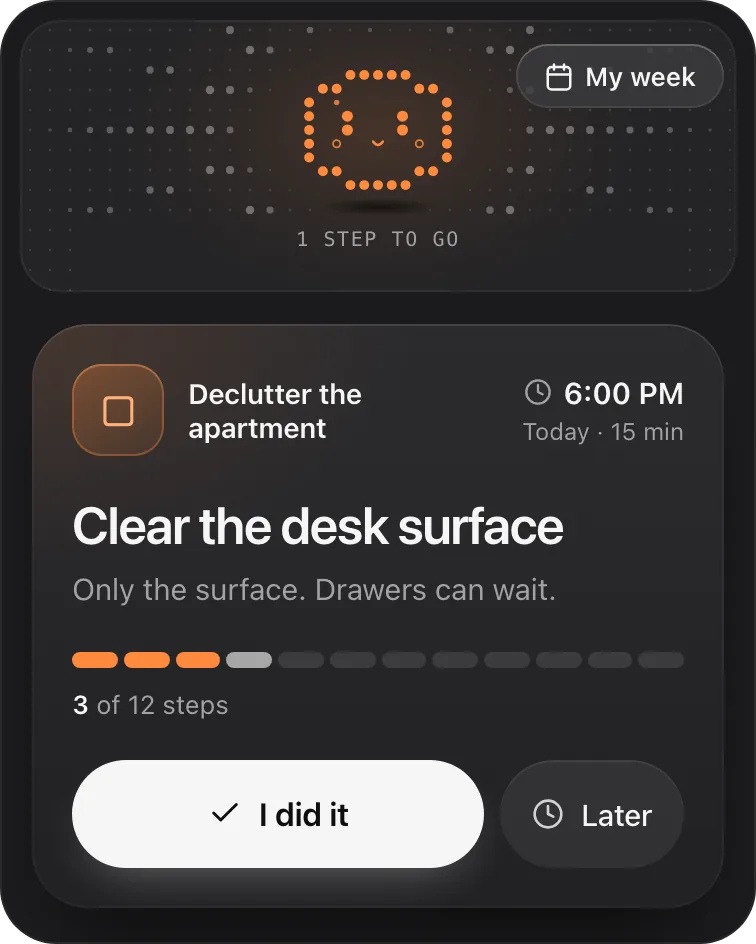
Petipa is in ChatGPT's plugin directory.
Enter a valid email.That didn't go through. Try again in a moment.
Add to ChatGPTQuestions
What does "This plugin isn't available to you" mean?
It most likely means the GPT you use has a replacement plugin you can't use yet. OpenAI's FAQ says a migrated plugin starts private, and access to a GPT doesn't carry over to its plugin.
Will my GPT stop working?
Not before December 11, 2026, OpenAI's scheduled retirement date. Some Enterprise and FedRAMP workspaces get until February 11, 2027. If a notice in your account gives another date, follow the notice.
Will I lose my chats with the GPT?
No. OpenAI's FAQ says past conversations with custom GPTs stay accessible after retirement, with nothing to do on your part.
Can I migrate someone else's GPT to a plugin?
No. Only its creator can, or a workspace admin in an Enterprise workspace. Using a GPT doesn't give you permission to migrate it.
Why can't I find the replacement plugin?
It may not be shared with you yet, or it may not be available on your plan, in your region, or in your workspace. Check Plugins, then Personal and Installed, and ask the GPT's creator or your admin.
What should I use if my custom GPT is no longer available?
A Project with your own instructions covers most personal GPTs. For a GPT that kept you on track with a goal, a plugin made for following a plan keeps the plan between chats.